
AppsApk Installer is a free Android app that installs XAPK, APKS and APK files in one tap, including large games that come with OBB game data. It picks the pieces your phone needs, copies the game data to the right folder, and hands everything to Android’s own installer. No ads, no account, no internet permission, and it weighs about 82 KB.
Updated November 21, 2026 · by Jaron Kim, developer of AppsApk Installer
Get AppsApk Installer
Free XAPK, APKS and APK installer with OBB support · no ads · no internet permission · Android 5.0+
Download the APK from AppsApk (64 KB)
Same app, same developer key as the Google Play version, so Play keeps it updated.
What AppsApk Installer does
- Installs XAPK files (APKPure-style app bundles) and APKS files (split APKs from SAI or Google’s bundletool), plus regular APKs.
- Installs games with OBB data in one step: the game data is copied to
Android/obb/<game>/before the install, so the game finds it on first launch. How OBB files work. - Picks only what your phone needs: the right processor piece (arm 64-bit, arm 32-bit or Intel), the right screen density and your languages.
- Safety check before you install: whether the file was signed by the same developer as the copy already on your phone, which Android versions it supports, and which sensitive permissions it asks for, in plain words, with the risky ones in red.
- Explains failed installs: not enough space, wrong processor, a newer version already installed, a copy signed by a different developer, a damaged file. Each reason comes with a one-tap fix.
- Recognises Google Play-only games: some games only run when installed from Google Play; the app sends you to the official listing instead of installing a copy that won’t start.
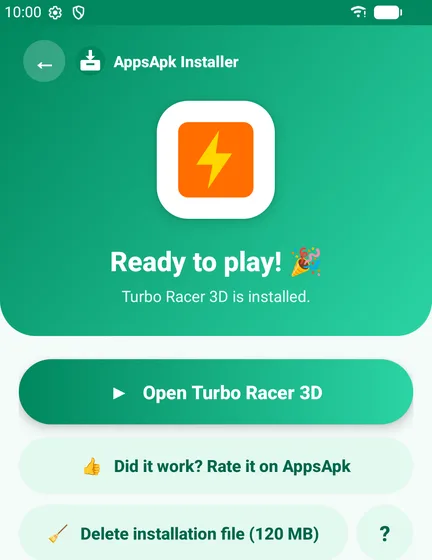
- Frees space afterwards: delete the installation file in one tap once the app is installed.
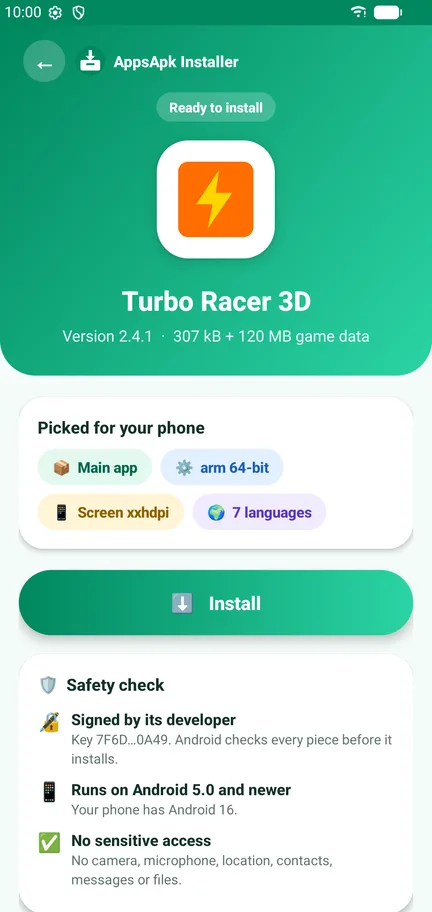
How to install an XAPK, APKS or OBB game
- Download the XAPK, APKS or APK file (it usually lands in your Download folder).
- Open it from your browser’s downloads or your file manager and choose AppsApk Installer, or open the app and tap Choose a file.
- Check the app name, version, size and the safety check, then tap Install.
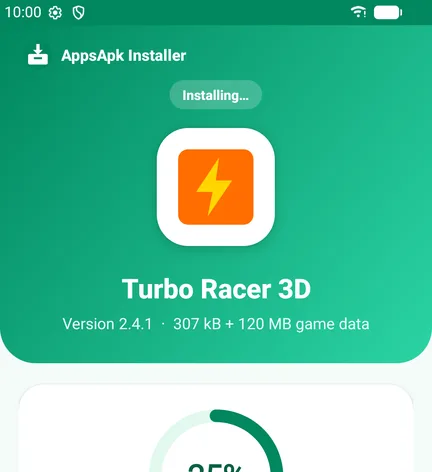
- If the game has OBB data, you’ll see Copying game data… for a few seconds.
- Confirm Android’s Install this app? prompt. Done: tap Open.
The first time, Android asks you to allow AppsApk Installer to install apps (one switch in settings). The full walkthrough with screenshots is in our step-by-step XAPK install guide.
Supported files
| File | What it is | Supported |
|---|---|---|
| .xapk | Split APKs + optional OBB game data in one ZIP (APKPure format) | ✅ including OBB |
| .apks | Split APKs for one phone (SAI, bundletool) | ✅ |
| .apk | A single Android app file | ✅ |
| .apkm | APKMirror’s own bundle format | ➖ use APKMirror Installer |
| .obb alone | Only the game data, without the app | ➖ needs the XAPK or the game installed first |
New to these formats? Read what an XAPK file is and what an APKS file is.
Why it’s private
AppsApk Installer does not have Android’s internet permission, so it cannot send or receive any data: no ads, no tracking, no analytics, no account. It installs only the file you choose, and every install goes through Android’s own confirmation screen. On Android 6 to 10, it asks for storage access only when a game comes with OBB data, to save that data in the games folder.
Google Play or direct download?
Both are the same app, signed with the same developer key. Google Play is the easiest way and keeps the app updated automatically. The direct APK from AppsApk is for phones without Google Play (for example some Huawei phones) or when Play isn’t available; if you later get it from Play, Play updates it normally.
Download AppsApk Installer
Free XAPK, APKS and APK installer with OBB support · no ads · no internet permission · Android 5.0+
Download the APK from AppsApk (64 KB)
Same app, same developer key as the Google Play version, so Play keeps it updated.
Developer: Jaron Kim (AppsApk). Requirements: Android 5.0 or newer. Size: about 82 KB. Price: free, no in-app purchases. Privacy policy.





Frequently Asked Questions
Is AppsApk Installer free?
Yes. It is free, with no ads, no in-app purchases and no account.
Does AppsApk Installer support OBB files?
Yes. When an XAPK contains OBB game data, the app copies it to Android/obb/<package name>/ and then installs the game, in one step.
Is AppsApk Installer safe?
It has no internet permission, so it cannot send or receive data. It installs only the file you pick, always through Android’s own confirmation, and shows a safety check (developer key, Android versions, sensitive permissions) first. Only install apps from sources you trust.
Which Android versions are supported?
Android 5.0 and newer, including Android 14, 15 and 16.
Can I install APKM files?
Not yet. APKM is APKMirror’s own format; use APKMirror Installer for it. XAPK, APKS and APK files are supported.
What is the difference between the Google Play version and the APK download?
None. It is the same app signed with the same developer key. Google Play updates it automatically.













Leave a Comment