
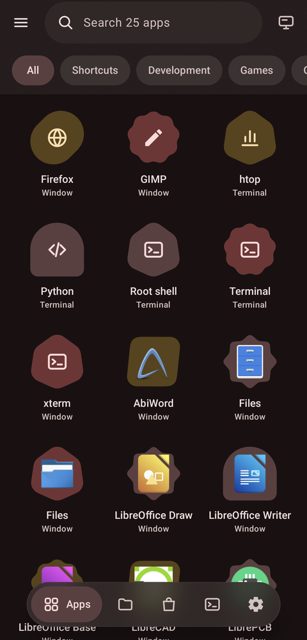
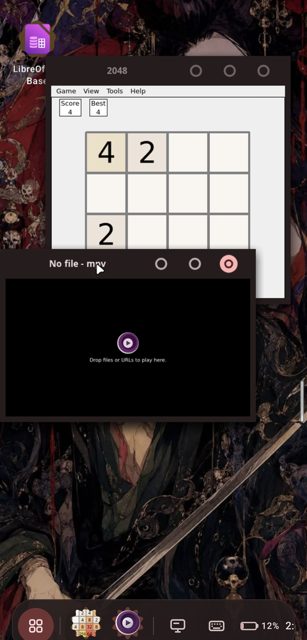
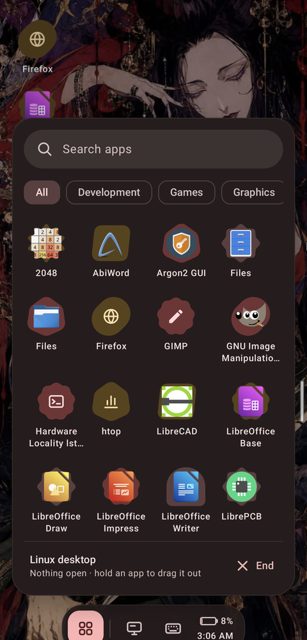
Tessera lets you install and run real Linux desktop apps on your Android phone, each one opening in its own window and its own Recents card, like a normal Android app. It pulls apps from Debian's catalog and from Flathub, and it runs them on the phone's GPU instead of a slow software renderer.
Developer: daryan044 · License: GPL-3.0 (open source) · Price: Free
Before you start: no root is required for the basic setup (PRoot mode). Root is only needed for extra features like a real chroot sandbox or pairing with a computer over USB. On first launch, open Tessera and tap Install to download and set up Debian 13.
Official file from the developer's release · Nov 7, 2026 · SHA-256 90b99fd4c2b12a9e…
Screenshots
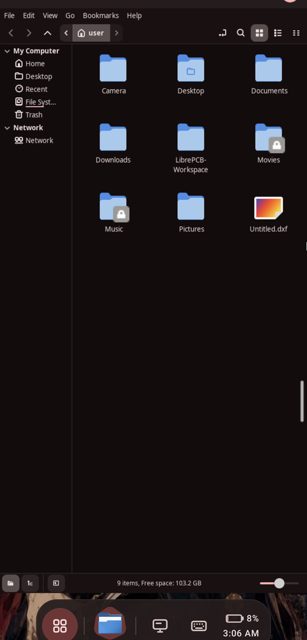
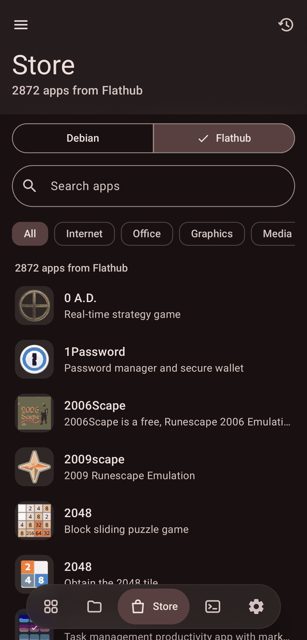
Key features
- <
- l
- i
- >
- I
Why isn’t Tessera on Google Play?
It is published by its developer on GitHub only and is not on Google Play or F-Droid.
Is Tessera safe?
Tessera is open source under the GPL-3.0 license, and the APK on this page is the v0.7.0 release built and published by the developer on GitHub. It is labeled an alpha release, so expect rough edges, and features like root shell or USB connections to a computer need root, which is optional. Tessera comes straight from its developer rather than through Google Play, so it hasn’t gone through Google’s app review. As with any app, check the permissions it asks for and install it if you’re comfortable with them.
How to install
- Tap the download button above: the APK file downloads straight to your phone.
- When Android asks, allow your browser to install unknown apps.
- Open the file and tap Install.
FAQ
Is Tessera free
Yes, it is free and open source software released under the GPL-3.0 license.
Do I need root to use it
No, root is optional. The app works with PRoot for installing and running Linux apps without root, and root unlocks extra options like a real chroot sandbox and USB connections to a computer.
How is this different from Termux or Andronix
Termux gives you a shell with its own package set, and AnLinux/Andronix give you a full distro through scripts plus a VNC viewer for graphics. Tessera builds in a full Debian/Flathub shell, GPU-accelerated windowed apps, an app store, and per-app permissions, all in one app.
More free apps you won’t find on Google Play: Open Source Apps · Best Android apps not on the Google Play Store.



Frequently Asked Questions
Is Tessera free
Yes, it is free and open source software released under the GPL-3.0 license.
Do I need root to use it
No, root is optional. The app works with PRoot for installing and running Linux apps without root, and root unlocks extra options like a real chroot sandbox and USB connections to a computer.
How is this different from Termux or Andronix
Termux gives you a shell with its own package set, and AnLinux/Andronix give you a full distro through scripts plus a VNC viewer for graphics. Tessera builds in a full Debian/Flathub shell, GPU-accelerated windowed apps, an app store, and per-app permissions, all in one app.













Leave a Comment