

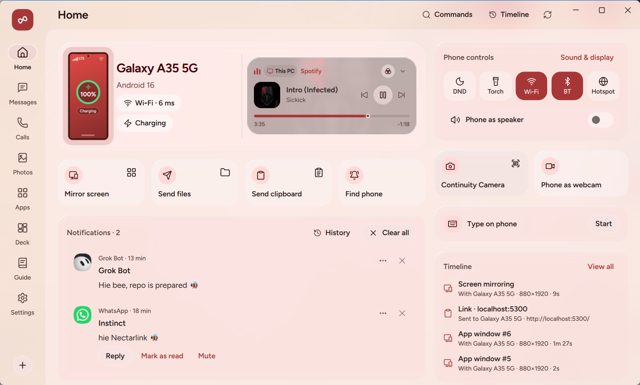
NectarLink connects your Android phone with your Windows or Linux PC so notifications, messages, calls, clipboard, files, photos, and even phone apps show up on whichever device you're using. It's built to replace juggling separate tools like Phone Link, KDE Connect, and LocalSend with one app on each side.
Developer: thtbee · License: NOASSERTION (open source) · Price: Free
Official file from the developer's release · Nov 5, 2026 · SHA-256 df48e7fe059569fc…
Screenshots
Key features
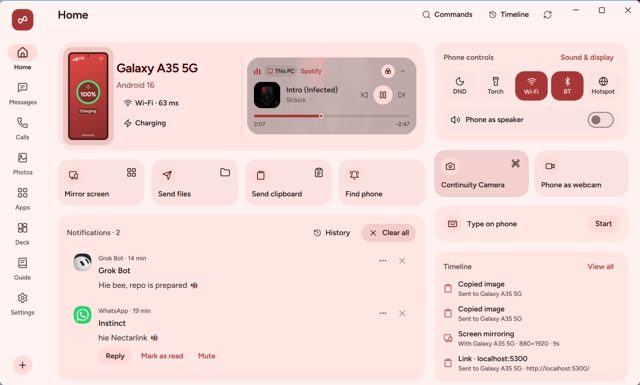
- Notifications, SMS/MMS and chat apps (RCS, WhatsApp, Telegram, Signal), and calls on your PC
- Two-way clipboard sync, file and folder transfer at Wi-Fi speed, and photo browsing
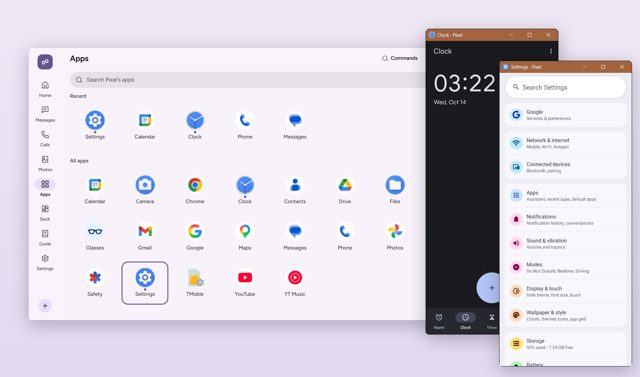
- Screen mirroring up to 60fps, and running phone apps in their own PC windows
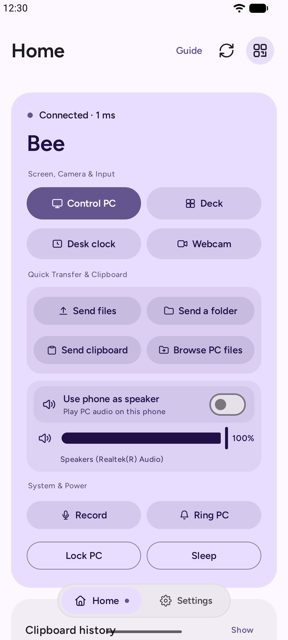
- Use the phone as a PC touchpad, keyboard, webcam, or speaker, plus a Deck of shortcut buttons
- Local-first and end-to-end encrypted with QUIC and TLS 1.3, no account or cloud server
Why isn’t NectarLink on Google Play?
NectarLink is published by its developer on GitHub only, not on Google Play or F-Droid.
Is NectarLink safe?
The apps (GPL-3.0-or-later) and core library (MPL-2.0) are open source, and downloads come straight from the developer's GitHub Releases, with the apps checking files against published SHA-256 sums before installing. The Windows installer isn't code-signed yet, so SmartScreen may show a warning the first time, and in some countries Google Play Protect blocks the APK install without extra steps.</safe>
<parameter name="before">Before you start: on Android, allow your browser or file manager to install apps when prompted. In India and some other countries, Google Play Protect blocks this APK with no "Install anyway" option; go to Play Store > your profile > Play Protect > Settings and pause "Scan apps with Play Protect" during install (then turn it back on), or install it from a PC using adb install. On Windows, if SmartScreen warns about the installer, choose "More info" then "Run anyway". For features Android reserves for privileged apps (phone apps in windows, real touch input, background clipboard sync), set up Wireless debugging once in the phone app; no root needed.
How to install
- Tap the download button above: the APK file downloads straight to your phone.
- When Android asks, allow your browser to install unknown apps.
- Open the file and tap Install.
FAQ
Is NectarLink free?
Yes. It's free and open source, with the apps licensed GPL-3.0-or-later and the core library MPL-2.0.
How do I pair my phone and PC?
Install NectarLink on both devices. On the PC, the setup walkthrough shows a QR code you scan with the phone, or you can pick the PC from the phone's nearby devices list and compare a 6-digit code. A USB cable with adb also works.
How is this different from Phone Link or KDE Connect?
According to the developer, NectarLink was made to cover what Phone Link, KDE Connect, and LocalSend did separately (notifications, clipboard, files) in one app on each side, plus extra features like phone apps in windows and a phone-as-webcam option.
More free apps you won’t find on Google Play: Open Source Apps · Best Android apps not on the Google Play Store.




Frequently Asked Questions
Is NectarLink free?
Yes. It's free and open source, with the apps licensed GPL-3.0-or-later and the core library MPL-2.0.
How do I pair my phone and PC?
Install NectarLink on both devices. On the PC, the setup walkthrough shows a QR code you scan with the phone, or you can pick the PC from the phone's nearby devices list and compare a 6-digit code. A USB cable with adb also works.
How is this different from Phone Link or KDE Connect?
According to the developer, NectarLink was made to cover what Phone Link, KDE Connect, and LocalSend did separately (notifications, clipboard, files) in one app on each side, plus extra features like phone apps in windows and a phone-as-webcam option.













Leave a Comment