
AndroidMic turns your Android phone into a microphone for your computer. It streams audio from the phone over WiFi or USB to a companion PC app, which feeds it into a virtual audio cable so other programs can use it as a microphone input.
Developer: teamclouday (with contributions from wiiznokes) · License: GPL-3.0 (open source) · Price: Free
Before you start: install a virtual audio cable on your PC first, since AndroidMic needs one to make the phone's audio appear as a microphone input. On Windows use Virtual Audio Cable (VAC) or VB Cable, on Linux set up a null sink with PulseAudio/PipeWire, and on macOS install BlackHole or a similar virtual audio driver.
Official file from the developer's release · Nov 6, 2026 · SHA-256 08c9b7470e9a23f0…
Screenshots
Key features
- Cross-platform PC app for Linux, Windows, and macOS
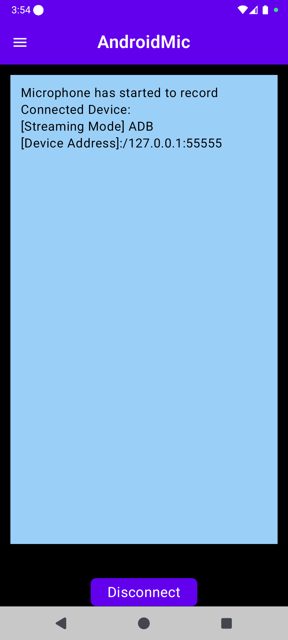
- Multiple connection options: WiFi (TCP/UDP), USB Serial, and USB ADB
- Noise cancellation and audio wave visualization
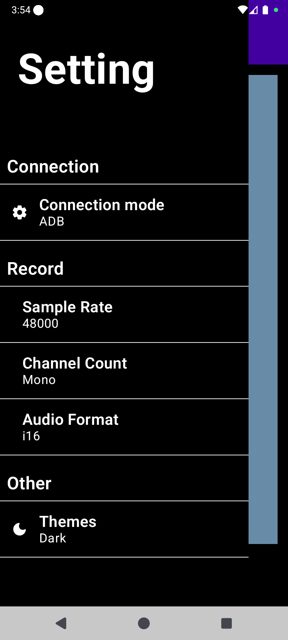
- Customizable audio settings: sample rate, channels, and bit depth
- Works with apps like Discord, Teams, Zoom, OBS, Streamlabs, and Audacity once set up
Why isn’t AndroidMic on Google Play?
AndroidMic is published by its developers on GitHub and is also available on F-Droid. It is not listed on Google Play.
Is AndroidMic safe?
AndroidMic is open source under the GPL-3.0 license, and the APK is available directly from the developer's GitHub releases page or F-Droid. On the phone it needs Microphone, Notification, and (on newer Android versions) Nearby devices permissions to connect to your PC; note that Windows Defender has sometimes flagged the PC app as a false positive. AndroidMic comes straight from its developer rather than through Google Play, so it hasn’t gone through Google’s app review. As with any app, check the permissions it asks for and install it if you’re comfortable with them.
How to install
- Tap the download button above: the APK file downloads straight to your phone.
- When Android asks, allow your browser to install unknown apps.
- Open the file and tap Install.
FAQ
Is AndroidMic free
Yes, it's a free, open-source app released under the GPL-3.0 license. You do need a separate virtual audio cable tool, but free options exist for Windows (VAC, VB Cable), Linux (PulseAudio/PipeWire) and macOS (BlackHole).
How do I connect my phone to my PC
Install the PC app and the Android app, then pick the same connection method (WiFi TCP/UDP, USB ADB, or USB Serial) on both sides. For WiFi, enter the PC's IP address and port shown in the PC app log; for USB ADB, enter the port number; for USB Serial, allow accessory mode when prompted on the phone.
What's the difference between the connection methods
WiFi (TCP/UDP) works over your local network as long as both devices are on the same network. USB ADB uses Android Debug Bridge over a USB cable. USB Serial connects over USB directly with the phone set to 'Charging only' mode and may require driver changes (Zadig/WinUSB) on Windows.
More free apps you won’t find on Google Play: Open Source Apps · Best Android apps not on the Google Play Store.






Frequently Asked Questions
Is AndroidMic free
Yes, it's a free, open-source app released under the GPL-3.0 license. You do need a separate virtual audio cable tool, but free options exist for Windows (VAC, VB Cable), Linux (PulseAudio/PipeWire) and macOS (BlackHole).
How do I connect my phone to my PC
Install the PC app and the Android app, then pick the same connection method (WiFi TCP/UDP, USB ADB, or USB Serial) on both sides. For WiFi, enter the PC's IP address and port shown in the PC app log; for USB ADB, enter the port number; for USB Serial, allow accessory mode when prompted on the phone.
What's the difference between the connection methods
WiFi (TCP/UDP) works over your local network as long as both devices are on the same network. USB ADB uses Android Debug Bridge over a USB cable. USB Serial connects over USB directly with the phone set to 'Charging only' mode and may require driver changes (Zadig/WinUSB) on Windows.













Leave a Comment