

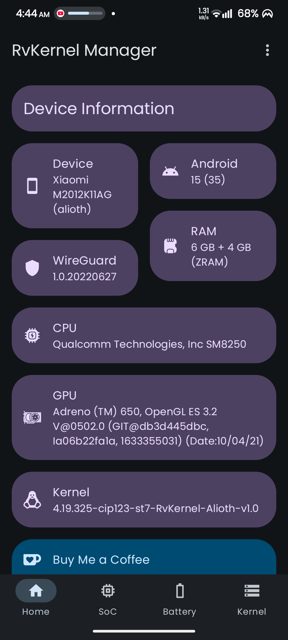
RvKernel Manager is an open-source app for tweaking your Android kernel's performance, battery, and system settings through a clean Material 3 interface. It is built for people who want hands-on control of CPU, GPU, and memory settings without digging through terminal commands.
Developer: Rve · License: GPL-3.0 (open source) · Price: Free
Before you start: your device must already be rooted, and it must use a Qualcomm Snapdragon SoC. The app will not work properly on non-Snapdragon chipsets or on devices without root access.
Official file from the developer's release · Feb 6, 2026 · SHA-256 16c4c5b7abe7d5de…
Screenshots
Key features
- Device info dashboard showing CPU, GPU, RAM, kernel and Android version
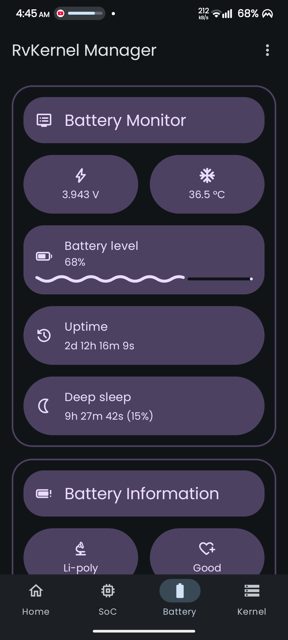
- Battery monitoring and control including fast charging, bypass charging, and thermal profiles
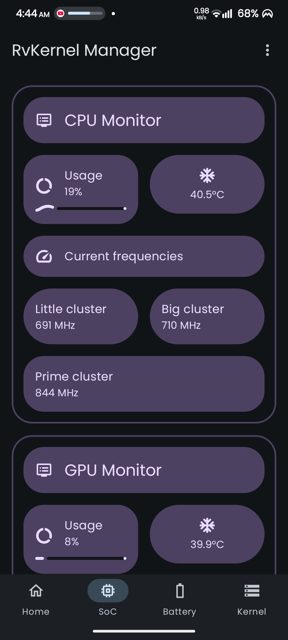
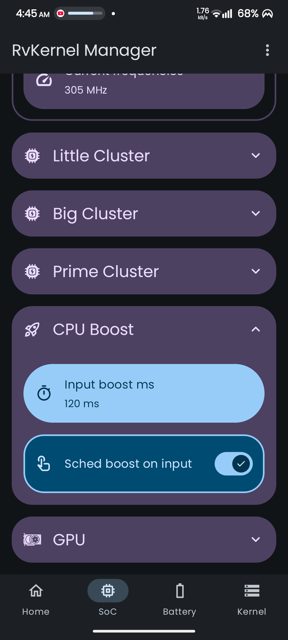
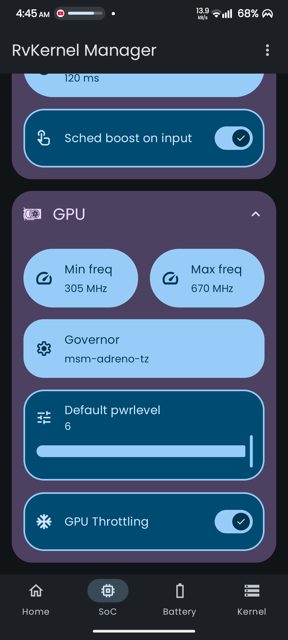
- SoC management with multi-cluster CPU support, governor selection, and frequency scaling
- Kernel parameter tuning for swappiness, ZRAM, TCP congestion control, and BORE scheduler
- Material 3 Expressive design with dynamic theming and dark/light modes
Why isn’t RvKernel Manager on Google Play?
RvKernel Manager is published by its developer on GitHub, and is also listed on IzzyOnDroid and OpenAPK, rather than on Google Play.
Is RvKernel Manager safe?
This app is open source under the GPL-3.0 license, and the APK on this page comes from the developer's official GitHub releases. Since it needs root access to change kernel parameters, only install it if you trust your root setup and understand the risks of modifying low-level device settings. RvKernel Manager comes straight from its developer rather than through Google Play, so it hasn’t gone through Google’s app review. As with any app, check the permissions it asks for and install it if you’re comfortable with them.
How to install
- Tap the download button above: the APK file downloads straight to your phone.
- When Android asks, allow your browser to install unknown apps.
- Open the file and tap Install.
FAQ
Is RvKernel Manager free?
Yes, it is free and open source under the GPL-3.0 license.
Do I need root access to use this app?
Yes, root access is required because the app directly modifies kernel parameters on your device.
Does RvKernel Manager work on any Android phone?
No, it currently only supports devices with Qualcomm Snapdragon SoCs running Android 12 or later.
Why isn't RvKernel Manager on Google Play?
The developer distributes it through GitHub releases, IzzyOnDroid, and OpenAPK instead of the Play Store.
More free apps you won’t find on Google Play: Open Source Apps · Best Android apps not on the Google Play Store.






Frequently Asked Questions
Is RvKernel Manager free?
Yes, it is free and open source under the GPL-3.0 license.
Do I need root access to use this app?
Yes, root access is required because the app directly modifies kernel parameters on your device.
Does RvKernel Manager work on any Android phone?
No, it currently only supports devices with Qualcomm Snapdragon SoCs running Android 12 or later.
Why isn't RvKernel Manager on Google Play?
The developer distributes it through GitHub releases, IzzyOnDroid, and OpenAPK instead of the Play Store.













Leave a Comment