

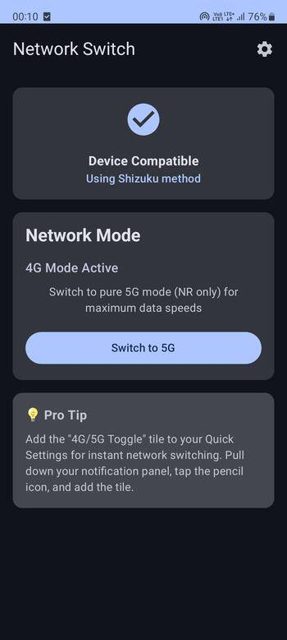
Network Switch is an Android app that lets you toggle between 2G, 3G, 4G, and 5G network modes in one tap. It supports 34 different network configurations and works through either root access or Shizuku, so you don't need to dig through hidden carrier settings menus.
Developer: aunchagaonkar · License: GPL-3.0 (open source) · Price: Free
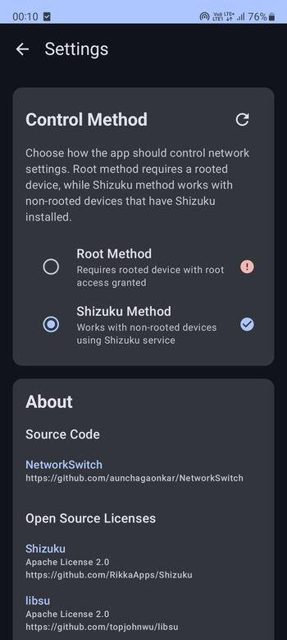
Before you start: if your device is not rooted, install the Shizuku app first and start it using ADB or Wireless ADB, then grant Network Switch permission through Shizuku. If your device is rooted, just grant root permission when the app asks for it.
Official file from the developer's release · Oct 2, 2025 · SHA-256 29cc70db20c866b0…
Screenshots
Key features
- C
- o
- n
- t
- r
- o
Why isn’t Network Switch on Google Play?
Network Switch is published by its developer on GitHub, and is not listed on Google Play or F-Droid.
Is Network Switch safe?
This is an open-source project (GPL-3.0) and the APK comes from the developer's own GitHub Releases page. It needs either root permissions or the Shizuku app running to control network settings, so only install it if you're comfortable granting one of those, and note it requires Android 10 or newer. Network Switch comes straight from its developer rather than through Google Play, so it hasn’t gone through Google’s app review. As with any app, check the permissions it asks for and install it if you’re comfortable with them.
How to install
- Tap the download button above: the APK file downloads straight to your phone.
- When Android asks, allow your browser to install unknown apps.
- Open the file and tap Install.
FAQ
Is Network Switch free
Yes. It is free and open source under the GPL-3.0 license, and the APK is available directly from the GitHub Releases page.
Do I need root to use it
No. You can use either root access on a rooted device, or the Shizuku app on a non-rooted device to grant the same level of system access.
How do I set up quick toggling between two network modes
Open the app, tap the configuration icon, choose Mode A and Mode B from the dropdown menus, preview the setup, then save it. You can then switch between those two modes from the main screen or the Quick Settings tile.
More free apps you won’t find on Google Play: Open Source Apps · Best Android apps not on the Google Play Store.




Frequently Asked Questions
Is Network Switch free
Yes. It is free and open source under the GPL-3.0 license, and the APK is available directly from the GitHub Releases page.
Do I need root to use it
No. You can use either root access on a rooted device, or the Shizuku app on a non-rooted device to grant the same level of system access.
How do I set up quick toggling between two network modes
Open the app, tap the configuration icon, choose Mode A and Mode B from the dropdown menus, preview the setup, then save it. You can then switch between those two modes from the main screen or the Quick Settings tile.













Leave a Comment