

Volume Manager lets you control the volume of each app on your phone independently, instead of being stuck with one system-wide volume slider. It uses Shizuku to reach privileged system APIs so it does not need root access, but it does need Android 13 and a bit of setup.
Developer: yume-chan · License: GPL-2.0 (open source) · Price: Free
Before you start: install and enable Shizuku (shizuku.rikka.app), since Volume Manager needs it to access privileged system APIs. You will also need a device running Android 13 or newer.
Official file from the developer's release · Oct 31, 2026 · SHA-256 8bd10f5a826d405f…
Screenshots
Key features
- <
- i
- t
- e
- m
Why isn’t Volume Manager on Google Play?
It is published by its developer on GitHub rather than the Play Store, and is still labeled work in progress, with an IzzyOnDroid F-Droid repo listing but no listing on the main F-Droid repo.
Is Volume Manager safe?
Volume Manager is open source under the GPL-2.0 license. You can get a hand-picked build from the GitHub Releases page, or grab the newest in-development build from the project's GitHub Actions artifacts, though those development builds may be less stable. Volume Manager comes straight from its developer rather than through Google Play, so it hasn’t gone through Google’s app review. As with any app, check the permissions it asks for and install it if you’re comfortable with them.
How to install
- Tap the download button above: the APK file downloads straight to your phone.
- When Android asks, allow your browser to install unknown apps.
- Open the file and tap Install.
FAQ
Is Volume Manager free
Yes. It is free and open source software released under the GPL-2.0 license.
How do I set it up
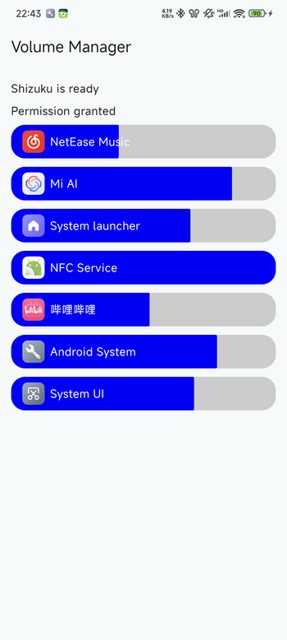
Install and enable Shizuku first, then launch Volume Manager and grant it Shizuku permission. It should automatically enable its accessibility service, after which you can change app volumes from the main screen, with volume buttons, a floating button, or a Quick Settings tile.
How is this different from SoundMaster in ShizuTools
Volume Manager uses a hidden API to change each audio stream's volume directly, works on protected apps, and adds no latency, but needs Android 13 and cannot set a separate output device, balance, or EQ per app. SoundMaster uses MediaProjection to record and post-process audio, supports per-app output device, balance, and EQ, and works from Android 10, but cannot control protected apps without patching them and can add latency.
More free apps you won’t find on Google Play: Open Source Apps · Best Android apps not on the Google Play Store.






Frequently Asked Questions
Is Volume Manager free
Yes. It is free and open source software released under the GPL-2.0 license.
How do I set it up
Install and enable Shizuku first, then launch Volume Manager and grant it Shizuku permission. It should automatically enable its accessibility service, after which you can change app volumes from the main screen, with volume buttons, a floating button, or a Quick Settings tile.
How is this different from SoundMaster in ShizuTools
Volume Manager uses a hidden API to change each audio stream's volume directly, works on protected apps, and adds no latency, but needs Android 13 and cannot set a separate output device, balance, or EQ per app. SoundMaster uses MediaProjection to record and post-process audio, supports per-app output device, balance, and EQ, and works from Android 10, but cannot control protected apps without patching them and can add latency.













Leave a Comment