
Open Shelf is an app store for Android TV that lists open-source TV apps straight from GitHub and installs them from each project's own releases. Instead of finding a phone, a download link and guessing which APK fits your box, Open Shelf picks the right one and installs it for you.
Developer: wingedpanther · License: GPL-3.0 (open source) · Price: Free
Before you start: on your Android TV, Google TV, Fire TV or Android box (Android 9 or newer), install the Downloader app from the Play Store, open it and enter the code 3399820 to fetch and install the latest Open Shelf version. Alternatively, download the OpenShelf-x.y.z.apk from the GitHub Releases page and install it from a computer with adb install OpenShelf-x.y.z.apk. The first time you install an app through it, allow the prompt to install from Open Shelf.
Official file from the developer's release · Nov 19, 2026 · SHA-256 065f4f746d78a0a3…
Screenshots
Key features
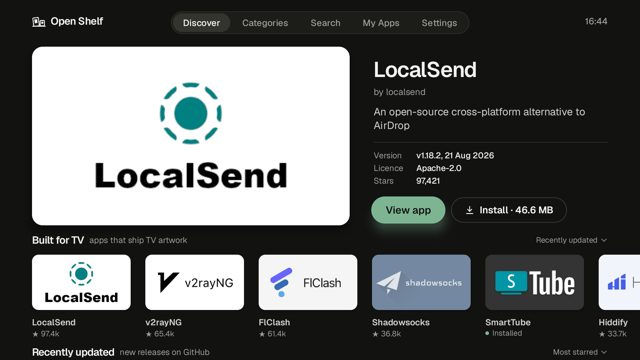
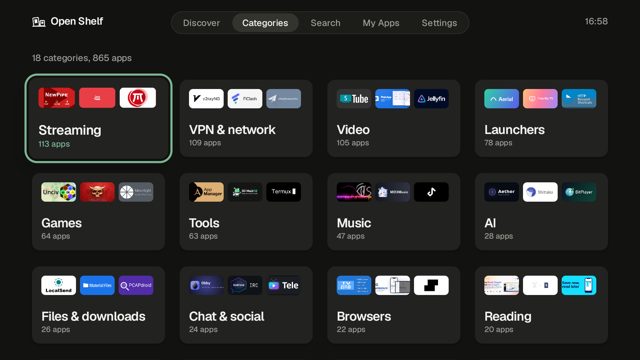
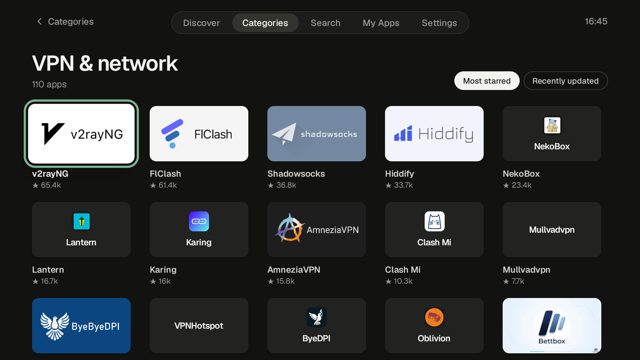
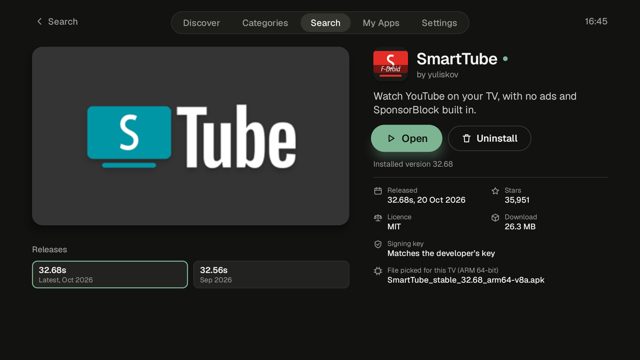
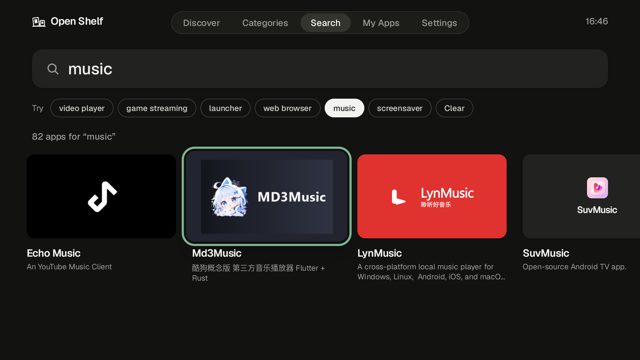
- Lists about 3,000 Android TV apps from GitHub, in 18 categories, each confirmed to support TV and ship an APK in its latest release
- Search by name or by what an app does, like "video player" or "launcher"
- Picks the APK that matches your TV's CPU and checks the signing key before installing an update
- My Apps shows what's installed, with updates for catalog apps and a count of waiting updates on the tab; on Android 12+ Update all skips the confirmation screen
- App pages show screenshots from the project's README, release notes, older releases, and point to a maintained fork if the original looks abandoned
- Light and dark themes with accent colour choices, and available in English, German, Spanish, Arabic, Japanese and Chinese
Why isn’t Open Shelf on Google Play?
Open Shelf is published by its developer on GitHub, not on Google Play. It's not on F-Droid either.
Is Open Shelf safe?
Open Shelf is open source under the GPL-3.0 licence, and the APK comes from the developer's own GitHub releases page. Because it installs other apps, it needs the "install unknown apps" permission, and Play Protect may flag it as a new app that can install apps; this is expected and explained in the app's own troubleshooting notes. Open Shelf comes straight from its developer rather than through Google Play, so it hasn’t gone through Google’s app review. As with any app, check the permissions it asks for and install it if you’re comfortable with them.
How to install
- Tap the download button above: the APK file downloads straight to your phone.
- When Android asks, allow your browser to install unknown apps.
- Open the file and tap Install.
FAQ
Is Open Shelf free?
Yes, it is open source software released under the GPL-3.0 licence.
Why does Play Protect say "Harmful app blocked"?
Play Protect is cautious about new apps that can install other apps. Tap More details, then Install anyway. If that option isn't there, turn off "Scan apps with Play Protect" in the Play Store's Play Protect settings, install Open Shelf, then turn scanning back on.
Does it work on Android 8 or older TVs?
No. Open Shelf needs Android 9 or newer, so it won't install on older Android TV devices.
More free apps you won’t find on Google Play: Open Source Apps · Best Android apps not on the Google Play Store.



Frequently Asked Questions
Is Open Shelf free?
Yes, it is open source software released under the GPL-3.0 licence.
Why does Play Protect say "Harmful app blocked"?
Play Protect is cautious about new apps that can install other apps. Tap More details, then Install anyway. If that option isn't there, turn off "Scan apps with Play Protect" in the Play Store's Play Protect settings, install Open Shelf, then turn scanning back on.
Does it work on Android 8 or older TVs?
No. Open Shelf needs Android 9 or newer, so it won't install on older Android TV devices.













Leave a Comment