

SpMp is a YouTube Music client for Android and desktop that puts a strong focus on customising colours and song metadata. It was built by a developer who was frustrated with the limited language and customisation options in the official YouTube Music app.
Developer: toasterofbread (sayaka-sh) · License: GPL-3.0 (open source) · Price: Free
Before you start: SpMp has been discontinued and succeeded by Kanon (hosted on GitLab at gitlab.com/syk.sh/kanon). If you still want to use SpMp on desktop, Java must be installed, and the Linux version needs several additional system packages listed in the project's documentation.
Official file from the developer's release · May 1, 2026 · SHA-256 58d34b25d208e3d3…
Screenshots

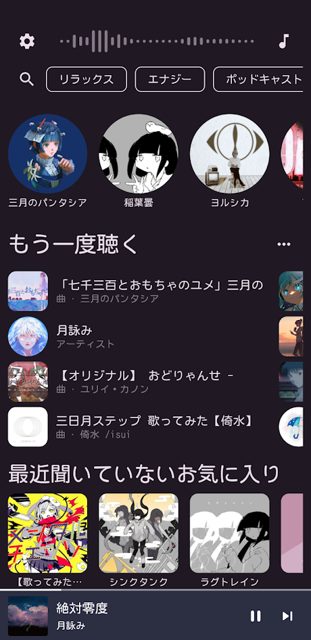
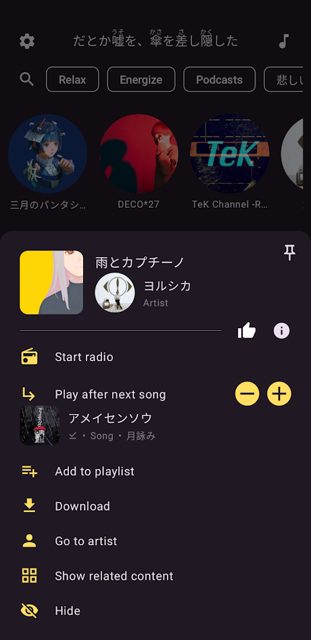
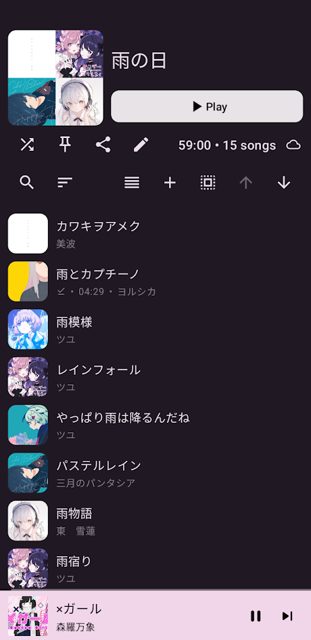
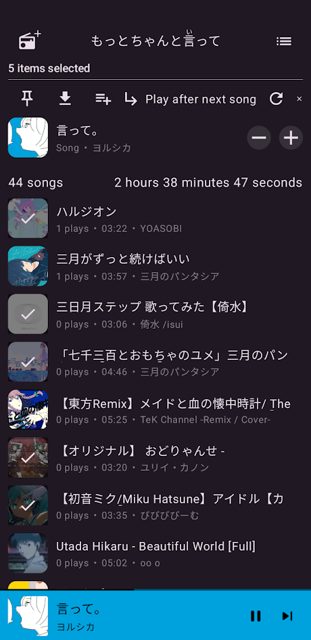
Key features
- Edit song, artist, and playlist titles, and select multiple songs for batch actions
- Customisable colour theming, including pulling a colour from the current song's thumbnail or setting a custom colour per-song or globally
- Display app UI and metadata like song titles in separate languages
- Time-synchronised lyrics from KuGou and PetitLyrics, with a toggleable lyrics bar and furigana readings over Japanese kanji
- Pin songs, playlists, albums, or artists to the top of the main page, customisable Discord rich presence, and in-app YouTube Music login
Why isn’t SpMp on Google Play?
SpMp is published by its developer on GitHub and F-Droid rather than on Google Play.
Is SpMp safe?
SpMp is open source under the GPL-3.0 license, and the APK on GitHub is the same file distributed on F-Droid, with no differences between the two. Note that the project is no longer maintained as of late 2024, so bugs and broken features will not be fixed, and the developer recommends switching to its successor, Kanon. SpMp comes straight from its developer rather than through Google Play, so it hasn’t gone through Google’s app review. As with any app, check the permissions it asks for and install it if you’re comfortable with them.
How to install
- Tap the download button above: the APK file downloads straight to your phone.
- When Android asks, allow your browser to install unknown apps.
- Open the file and tap Install.
FAQ
Is SpMp free to use
Yes. It is open source software released under the GPL-3.0 license.
Is SpMp still being updated
No. According to the README, SpMp has not been maintained since late 2024 and has been succeeded by a new project called Kanon, which shares the same basic features and core design.
Where can I get time-synced lyrics in SpMp
SpMp displays time-synchronised lyrics from KuGou and PetitLyrics in a toggleable bar above every app page, including furigana readings above Japanese kanji.
More free apps you won’t find on Google Play: Open Source Apps · Best Android apps not on the Google Play Store.






Frequently Asked Questions
Is SpMp free to use
Yes. It is open source software released under the GPL-3.0 license.
Is SpMp still being updated
No. According to the README, SpMp has not been maintained since late 2024 and has been succeeded by a new project called Kanon, which shares the same basic features and core design.
Where can I get time-synced lyrics in SpMp
SpMp displays time-synchronised lyrics from KuGou and PetitLyrics in a toggleable bar above every app page, including furigana readings above Japanese kanji.













Leave a Comment