
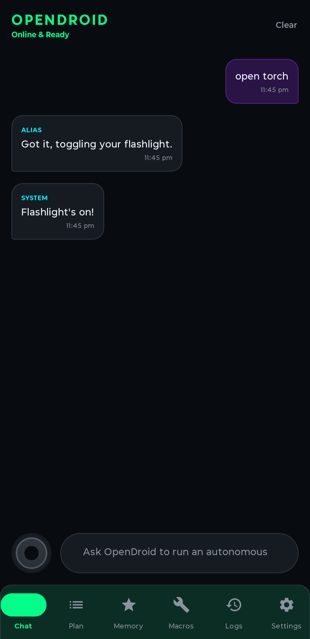
OpenDroid is an open-source AI agent that runs on your Android phone and actually performs tasks for you, not just chats. You give it a command like checking the weather and texting someone if it will rain, and it plans the steps, carries them out using accessibility-driven screen automation, and adapts if something fails.
Developer: JMAN730 · License: NOASSERTION (open source) · Price: Free
Before you start: OpenDroid needs an API key from one of its supported LLM providers (Gemini, Groq, and Ollama are recommended) which you add in the app's Settings after install. If you build it yourself instead of using a release APK, you need JDK 21 and Android SDK 35 installed.
Official file from the developer's release · Nov 10, 2026 · SHA-256 cafe14e8f36c13fb…
Screenshots


Key features
- Self-planning agent engine that breaks commands into steps, tracks dependencies, and replans when a step fails
- On-device model manager (LiteRT-LM) with background downloads, pause/resume, and offline import of .task/.litertlm model files
- Full device control: WiFi, Bluetooth, brightness, WhatsApp/Telegram/SMS/calls, alarms, calendar events, Maps directions, music, and more
- Vision engine that reads the screen via the Accessibility API for real-time screen analysis and 'Read & Remember' note extraction
- Support for 13 LLM providers (Gemini, Claude, GPT-4o, Groq, DeepSeek, Ollama, and others) with automatic fallback if one fails
Why isn’t OpenDroid on Google Play?
OpenDroid is published by its developer on GitHub rather than distributed through Google Play. It is not listed on F-Droid either.
Is OpenDroid safe?
OpenDroid is open source under the Apache License 2.0, and the README points to the official GitHub releases page for builds. It requests broad permissions (Accessibility Service, Write Settings, Record Audio, Notification Access) because its core function is automating your phone, so only install it if you're comfortable granting that level of access. OpenDroid comes straight from its developer rather than through Google Play, so it hasn’t gone through Google’s app review. As with any app, check the permissions it asks for and install it if you’re comfortable with them.
How to install
- Tap the download button above: the APK file downloads straight to your phone.
- When Android asks, allow your browser to install unknown apps.
- Open the file and tap Install.
FAQ
Is OpenDroid free to download?
The app itself is free and open source under the Apache 2.0 license. Some LLM providers it connects to, like Gemini's free tier, Groq, or Ollama running locally, have their own costs or are free depending on which you choose.
Do I need to grant accessibility permissions?
Yes. OpenDroid relies on the Accessibility Service to read the screen and control other apps, which is how it automates tasks like sending WhatsApp messages or reading screen content. On first launch it walks you through granting this along with Write Settings, Record Audio, and Notification Access.
Can OpenDroid work fully offline?
Yes, if you use its on-device model manager (LiteRT-LM) to import or download a local model, or connect it to Ollama running locally, instead of a cloud LLM provider.
More free apps you won’t find on Google Play: Open Source Apps · Best Android apps not on the Google Play Store.






Frequently Asked Questions
Is OpenDroid free to download?
The app itself is free and open source under the Apache 2.0 license. Some LLM providers it connects to, like Gemini's free tier, Groq, or Ollama running locally, have their own costs or are free depending on which you choose.
Do I need to grant accessibility permissions?
Yes. OpenDroid relies on the Accessibility Service to read the screen and control other apps, which is how it automates tasks like sending WhatsApp messages or reading screen content. On first launch it walks you through granting this along with Write Settings, Record Audio, and Notification Access.
Can OpenDroid work fully offline?
Yes, if you use its on-device model manager (LiteRT-LM) to import or download a local model, or connect it to Ollama running locally, instead of a cloud LLM provider.













Leave a Comment