

Gearslip is an open-source alternative to Android Auto. It talks to your car's head unit directly, over USB or wireless, without any Google software involved, letting your map, music, and messaging apps draw their car screens through it.
Developer: Twink Software LLC (twinksoftware) · License: AGPL-3.0 (open source) · Price: Free
Before you start: set this up while your car is parked, and keep another way to navigate handy since this is alpha software. On first launch, choose where your Android Auto certificate comes from (the aasdk project's public one, or your own file), then grant the permissions it asks for one at a time. On GrapheneOS, make sure USB-C port control is not set to Charging-only, or the car won't see the phone over a data cable.
Official file from the developer's release · Nov 5, 2026 · SHA-256 a0acaa02e889df76…
Screenshots
Key features
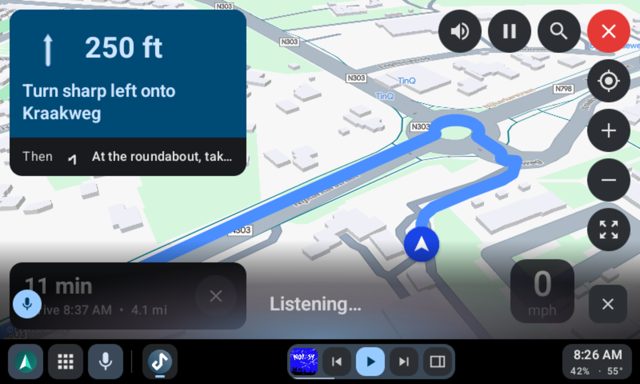
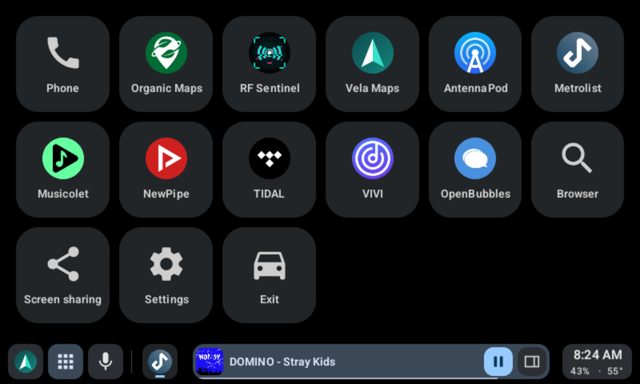
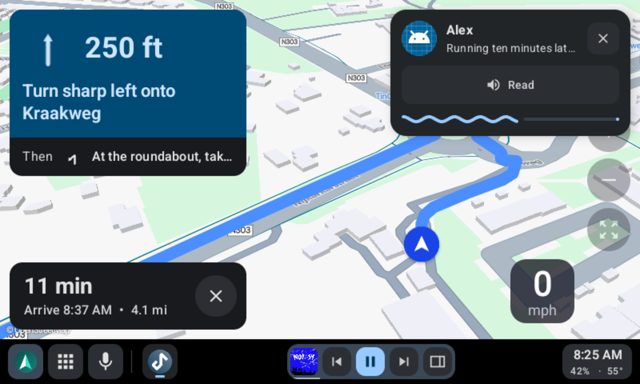
- Hosts real map apps like Organic Maps, Vela, OsmAnd, Waze, and MapQuest on the car screen with alerts and a big turn card
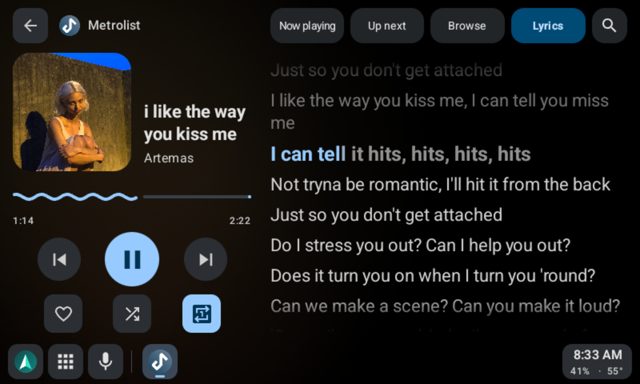
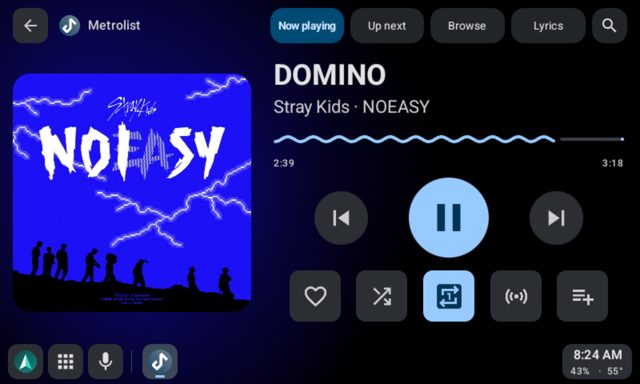
- Plays music from any car-ready media app, with Now Playing, Up Next, search, and lyrics; Spotify plays through Gearslip's own player
- Handles calls over the car's Bluetooth, with a nav bar showing who you're talking to
- Reads messages aloud and lets you reply by voice or quick reply
- Voice commands for navigation, music, and calls, plus a built-in web browser and a weather/calendar dashboard
Why isn’t Gearslip on Google Play?
Gearslip is published by its developer on GitHub rather than Google Play. It is alpha software, so it can drop the connection, freeze the car screen, or fail to start, and a new release could break a car that worked before.
Is Gearslip safe?
Gearslip is open source under AGPL-3.0, and the README gives a SHA-256 cert fingerprint and a guide to verifying your download with AppVerifier or apksigner. It needs no adb, root, or Shizuku for its core features, though optional adb commands are offered for audio routing, and it does ask for a screen-share permission each drive if you choose to send audio through Gearslip instead of Bluetooth. Gearslip comes straight from its developer rather than through Google Play, so it hasn’t gone through Google’s app review. As with any app, check the permissions it asks for and install it if you’re comfortable with them.
How to install
- Tap the download button above: the APK file downloads straight to your phone.
- When Android asks, allow your browser to install unknown apps.
- Open the file and tap Install.
FAQ
Is Gearslip free?
The app itself is licensed under AGPL-3.0 and available from its GitHub releases page. Twink Software LLC also sells a separate commercial license for private use outside the AGPL's terms, as noted in the project's NOTICE.md.
How do I connect Gearslip to my car?
Plug the phone into the car's USB port, or in a car with wireless Android Auto, pair the phone with the car over Bluetooth, tap Connect wirelessly, and pick the car. After the first wireless drive, Android asks once whether Gearslip may watch for that car, and from then on it connects automatically whenever the car's Bluetooth does.
Does Gearslip work with every car and app?
It works with most cars over USB or wireless, though some cars from about 2020 on need your own certificate; CARS.md lists cars drivers have confirmed. It does not work with Spotify's or Google Messages' own car screens, which only accept Android Auto, and TIDAL only lets approved apps browse its library.
More free apps you won’t find on Google Play: Open Source Apps · Best Android apps not on the Google Play Store.





Frequently Asked Questions
Is Gearslip free?
The app itself is licensed under AGPL-3.0 and available from its GitHub releases page. Twink Software LLC also sells a separate commercial license for private use outside the AGPL's terms, as noted in the project's NOTICE.md.
How do I connect Gearslip to my car?
Plug the phone into the car's USB port, or in a car with wireless Android Auto, pair the phone with the car over Bluetooth, tap Connect wirelessly, and pick the car. After the first wireless drive, Android asks once whether Gearslip may watch for that car, and from then on it connects automatically whenever the car's Bluetooth does.
Does Gearslip work with every car and app?
It works with most cars over USB or wireless, though some cars from about 2020 on need your own certificate; CARS.md lists cars drivers have confirmed. It does not work with Spotify's or Google Messages' own car screens, which only accept Android Auto, and TIDAL only lets approved apps browse its library.













Leave a Comment