

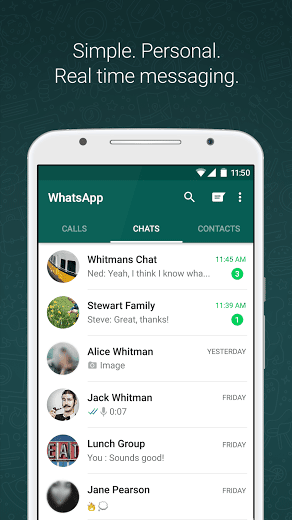

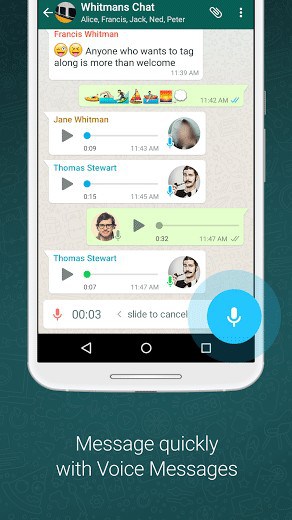
WHY USE WHATSAPP:• NO FEES: WhatsApp uses your phone’s Internet connection (4G/3G/2G/EDGE or Wi-Fi, as available) to let you message and call friends and family, so you don’t have to pay for every message or call.* There are no subscription fees to use WhatsApp.• MULTIMEDIA: Send and receive photos, videos, documents, and Voice Messages.• FREE CALLS: Call your friends and family for free with WhatsApp Calling, even if they’re in another country.* WhatsApp calls use your phone’s Internet connection rather than your cellular plan’s voice minutes. (Note: Data charges may apply. Contact your provider for details. Also, you can’t access 911 and other emergency service numbers through WhatsApp).• GROUP CHAT: Enjoy group chats with your contacts so you can easily stay in touch with your friends or family.• WHATSAPP WEB: You can also send and receive WhatsApp messages right from your computer’s browser.• NO INTERNATIONAL CHARGES: There’s no extra charge to send WhatsApp messages internationally. Chat with your friends around the world and avoid international SMS charges.*
• SAY NO TO USERNAMES AND PINS: Why bother having to remember yet another username or PIN? WhatsApp works with your phone number, just like SMS, and integrates seamlessly with your phone’s existing address book.
• ALWAYS LOGGED IN: With WhatsApp, you’re always logged in so you don’t miss messages. No more confusion about whether you’re logged in or logged out.
• QUICKLY CONNECT WITH YOUR CONTACTS: Your address book is used to quickly and easily connect you with your contacts who have WhatsApp so there’s no need to add hard-to-remember usernames.
• OFFLINE MESSAGES: Even if you miss your notifications or turn off your phone, WhatsApp messenger will save your recent messages until the next time you use the app.
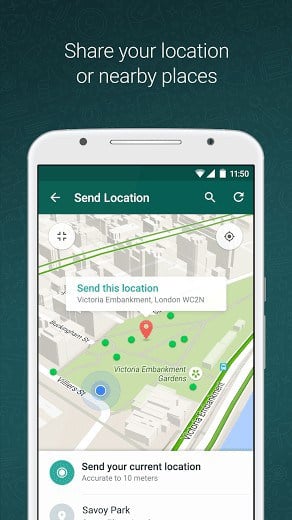
• AND MUCH MORE: Share your location, exchange contacts, set custom wallpapers and notification sounds, email chat history, broadcast messages to multiple contacts at once, and more!
*Data charges may apply. Contact your provider for details.
What’s New
• Play videos right away without waiting for them to download first. Videos will still be downloaded to your phone as the video is playing. (Android 4.1+ and only works with videos sent from the latest version of the Android app)
• Introducing WhatsApp video calling. With free video calls, you can have face-to-face chats with your friends and family around the world. Data charges may apply. (requires Android 4.1+)
• You can now send and receive animated GIFs
You may also be interested in whatscan for whatsapp
Additional information
Latest
31 MB
Android 4.0 and up
1,000,000,000 – 5,000,000,000 downloads
WhatsApp Inc.





Frequently Asked Questions
Is WhatsApp Messenger free to download and use on Android?
Yes, WhatsApp Messenger is a free messaging app available for Android. There are no subscription fees to use WhatsApp. The app uses your phone's internet connection (4G/3G/2G/EDGE or Wi-Fi) for messaging and calling, so you avoid standard SMS charges.
What features does WhatsApp Messenger offer?
WhatsApp Messenger allows you to send and receive messages, calls, photos, videos, documents, and voice messages. You can also make free calls to friends and family worldwide, create group chats, access WhatsApp Web for messaging from your computer, and use your existing phone contacts without needing usernames or PINs.
Can I make free calls with WhatsApp Messenger?
Yes, you can call your friends and family for free with WhatsApp Calling, even internationally. WhatsApp calls use your phone's internet connection rather than your cellular plan's voice minutes, though data charges may apply depending on your provider. Note that emergency service numbers (like 911) cannot be accessed through WhatsApp.
How do I install WhatsApp Messenger on my Android phone?
WhatsApp Messenger is available for Android devices. You can download it and install it on your smartphone. The app integrates seamlessly with your phone's existing address book and you stay logged in automatically so you won't miss messages.
Will I have international charges when using WhatsApp Messenger?
No, there are no extra charges to send WhatsApp messages internationally. You can chat with friends around the world and avoid international SMS charges by using WhatsApp's internet-based messaging instead of traditional cellular messaging.
What internet connection types does WhatsApp Messenger support?
WhatsApp Messenger works with 4G, 3G, 2G, EDGE, or Wi-Fi connections. The app uses whatever internet connection is available on your Android device to send messages and make calls.
not working in nokia x please give a proper solution
wow!!!!!best app!!!!great…..nice what’sapp.apk… beautiful……
my whats app not working please help me nokia xl
whatsapp is best app
Better option for now
Thanks
For those who want to use in PC, you need blustack, the all in one android application manager for window. However , your computer/laptop must have graphic card with it.
And to those who can’t download it just switch off your device and start downloading it again.
And those who can’t activate please check your device and sure that no cleaning applications installed on your device. Network congestion, inactive phone numbers are also the other major problems for activating Whatsapp.
nice whats app……
What’s app is great working……..
Good morning
Good evening everyone,i have been trying to download whatsapp messenger here but its not working…can anyone help out here.thank you
great
can’t open that.plz help?
thanks
app is great
Yahan installation bloked aa ra kya kru?????
Setting > security > unknown sources pr click krke allow krdo n u’r done
why can not i installed on xp window?
only on windows 7/8 by using blue stack start
helpp
nice its install
Very nice whatsapp
nice app.. succefully install in android vrsion abooov 4.0+
Why can’t I install this app?? 🙁
I really like easy to download I have slide problem I can’t send vedio which is morthen 2 mints I want your advice thanks
Apk bast
I love that
when I am trying to download, i am getting the message
” Content too large, aborted”
Can anyone please help to overcome this??
I have downloaded it from this website instead of the app store .
you mean play store 🙂
He mean appstore..is the store for iOS.. Whatsapp is even for iOS
hi iam ashish singh rauthan and my problem is im not use whatsapp in my laptop because it is not support fully computer no any software for computer.
Try Bluestacks emulator. It runs android applications on pc.
use bluestacks or youwave if you have more than 2 gb ram if not contact with me i give u the answer
hy ashish this is my answer,this web is contain androd’s application so if you have android device you will find all of android applications here,
Install Bluestacks and run .Apk Files
برنامه های خوبی دارید.ooooooooookkkkkkkkkkk
cool
I like whatsapp, it’s the fastest way to communiate..
Whatsaap is best app but this apps is not downloaded in my android phone
if your phone is an imitation insert an SD/ Mirco SD card and try to download again.but if not check if there is enough memory to perform the action
Thanks for best app .