

WebToApp is a tool that turns a website, a set of HTML files, or even a small Node.js/PHP/Python/Go project into a signed Android APK, all built directly on your phone with no PC or remote build server needed. It goes beyond the usual "wrap a URL in a WebView" approach by letting you run real local server runtimes, apply network and privacy hardening, and even export AAB files ready for the Google Play Store.
Developer: shiaho777 · License: Unlicense (open source) · Price: Free
Before you start: download the APK from the official GitHub Releases page at github.com/shiaho777/web-to-app/releases and install it on a device running Android 7.0 or newer. You may need to allow installs from unknown sources in your device settings since this app is not distributed through Google Play.
Official file from the developer's release · Nov 5, 2026 · SHA-256 1ba7657449df1c30…
Screenshots
Key features
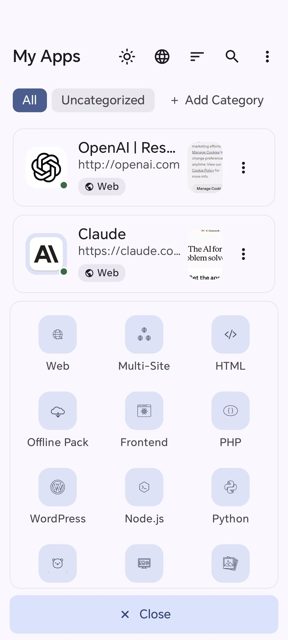
- Build from a website URL, HTML/static files, Node.js, PHP, Python, Go, WordPress, images, video, or galleries, with support for multiple sites in one app
- Run real on-device server runtimes (Node.js 18.20, PHP 8.4, Python 3.14, Go 1.26.10, WordPress over SQLite) fork and exec'd as native binaries
- Networking and anti-censorship tools: DNS-over-HTTPS, TLS fingerprint spoofing, Encrypted Client Hello, static/PAC/SOCKS5 proxies, and CORS bypass
- On-device signing with V1/V2/V3 and Google Play-ready AAB export with targetSdk rewrite, all done inside the app
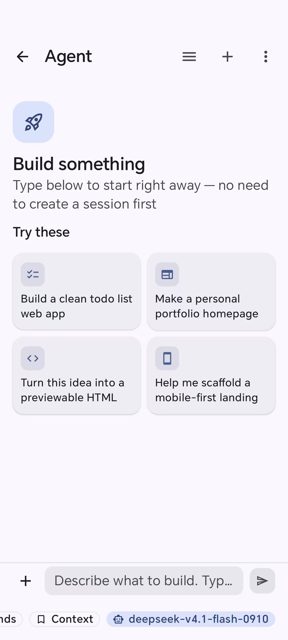
- Extend finished apps with JS/CSS modules, userscripts, or MV3 Chrome extensions, and an Agent that can automate building and configuring apps through chat
- Host app interface available in 10 languages including English, Chinese, Arabic (RTL), Spanish, French, German, Russian, Japanese, and Korean
Why isn’t WebToApp on Google Play?
WebToApp is not listed on Google Play. It is published by its developer on GitHub, where you can download the APK directly from the Releases page.
Is WebToApp safe?
WebToApp is open source under the Unlicense, and the README points to its official GitHub Releases page as the source for the APK. It requires Android 7.0 (API 24) or newer, and some advanced build targets (Node.js, PHP, Python, Go, WordPress, image, video) are off by default and need to be turned on in About → Advanced features.
How to install
- Tap the download button above: the APK file downloads straight to your phone.
- When Android asks, allow your browser to install unknown apps.
- Open the file and tap Install.
FAQ
Is WebToApp free to use
Yes. It is open source under the Unlicense and is distributed as a free APK download from GitHub Releases.
How do I turn a website into an APK with WebToApp
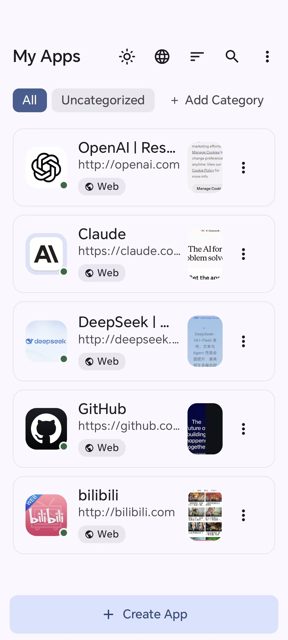
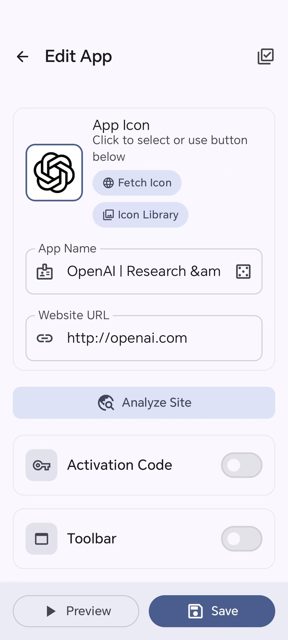
Open the app, tap Create on the My Apps screen, choose a build type like Web, enter the app name and target URL, save, preview it, then tap Build APK to get a signed APK.
Can WebToApp build apps for the Google Play Store
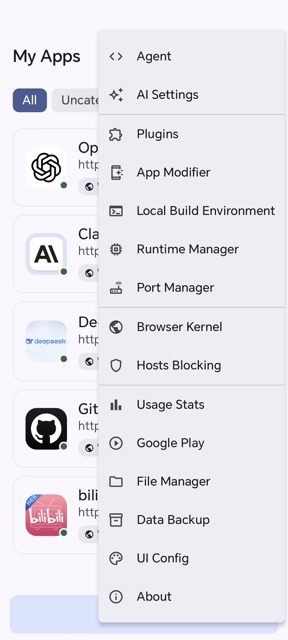
Yes. Using the Google Play option in the app's menu builds the APK, converts it to a signed AAB with the target SDK rewritten, and generates Play metadata, all on the device.
More free apps you won’t find on Google Play: Open Source Apps · Best Android apps not on the Google Play Store.





Frequently Asked Questions
Is WebToApp free to use
Yes. It is open source under the Unlicense and is distributed as a free APK download from GitHub Releases.
How do I turn a website into an APK with WebToApp
Open the app, tap Create on the My Apps screen, choose a build type like Web, enter the app name and target URL, save, preview it, then tap Build APK to get a signed APK.
Can WebToApp build apps for the Google Play Store
Yes. Using the Google Play option in the app's menu builds the APK, converts it to a signed AAB with the target SDK rewritten, and generates Play metadata, all on the device.













Leave a Comment