

videodownloader.fbvideodownloader.facebookvideodownloader.videodownloaderforfacebook


Download Facebook Videos with the Video Downloader for Facebook APK
Video Downloader for Facebook is a free Android app that saves any Facebook video to your phone in one tap — no link copying, no watermark, and full HD support. Grab the latest APK below to download FB videos, Reels and Watch clips for offline viewing or resharing.
New to installing APK files? Follow our APK downloader guide, browse more Facebook apps for Android, or try the link-paste alternative MyVideoDownloader for Facebook.
Video Downloader for Facebook app can help you download all videos from Facebook with very simple steps. It is super fast ? and 100% free.
Imagine you are on the feed of Facebook and interested in a video, you want to save the video and watch offline , or share with your friends, or repost to other social medias. Then how?
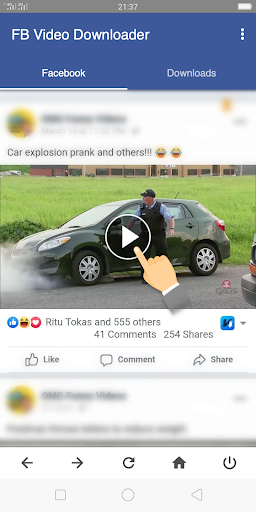
With some other Video Downloader, you have to copy the video link from Facebook and paste it to the downloader. It is very complicated and not user friendly. But with this Video Downloader for Facebook, you just need to click the video you like and download it. It is super easy and fast. Your video will be in Downloads tab soon. You can play it whenever you want or share to others.
So please install this Video Download for FB app and have a try now!
How to Use :
1. Open Video Downloader for Facebook (Also shown as FB Video Downloader)
2. Log in Facebook and play the video you want to download
3. Click the download button to download videos
Done
Features:
– Free video downloader, Download all media clips from facebook free
– Super fast video downloader, Addition download speed boost
– View Facebook feeds with the built-in browser
– Download videos in the background
– Download reminder and download notification to let you know the download status anytime
– Download several videos at same time, support multiple downloading tasks.
– Full-featured download manager to pause, resume and remove downloads
– Resume failed download
– Auto resume download when the network is available
– Full High Definition video download ( HD Video Download ) supported
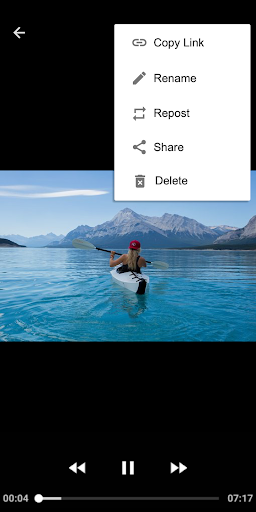
– Play videos offline with the built-in video player
– Support copy link, share, rename, repost for the downloaded videos
– Simple steps and easy to use
– User friendly and clean and clear UI
– Small size and lightweight
Video Downloader for Facebook is a dedicated downloader to download all videos from Facebook feeds, groups and pages. With very easy steps, you can download the videos you interested to your device and save videos as long as you want. The Downloads tab keeps all of your downloaded media clips. You can easily check and watch videos offline. The multi-function design can help you easily manage the downloaded FB videos, you can share the media clips with your friends or repost videos to other social medias. It is very efficient and user friendly.
Video Downloader for Facebook supports multi-task downloads, so you can download several FB videos at the same time. The default super download mode can boost your download speed up to 3 times faster than other downloads with its multi-thread download tech.
The built-in video player can play all the videos you downloaded.
So it is really a good download tool for Facebook deserves to be installed and try
Notes:
– Though Video Downloader for Facebook (also shown as FB Video Downloader) is a fast FB video downloader and free FB video downloader, it is not affiliated with Facebook. It is a tool for Facebook video download.
– We respect the copyright of the owners. So please DO NOT download or repost the videos and media clips without owners’ permission.
If the Facebook Video Downloader is helpful for you, please rate us ?????
If you want to feedback, please leaving us a feedback in the feedback websites: https://docs.google.com/forms/d/e/1FAIpQLSfJ_hiisjFDNS_wY_c1sq7RcUEERSOiIWlyXAteZlNWr9YJyA/viewform
We will try best to improve.
If you need to support, please email us via [email protected].
Thanks very much for using Video Downloader for Facebook – FB Video Downloader.
What’s New
?Best video downloader for Facebook, Download Facebook videos fast and free
?Easy to use, Great UI and user friendly
?Support multi tasks download, so you can download several videos in the same time
?Super fast download speed. Additional download speed boost up to 3 times faster that other downloader
?Built-in video play to smoothly play all the videos downloaded
?Easy actions to play videos, rename videos and repost videos
Additional information
Video Downloader for Facebook – FB Video Download
videodownloader.fbvideodownloader.facebookvideodownloader.videodownloaderforfacebook
1.02.01.1121.3
5.22 MB
Video Downloader & Video Player & Photo Downloader
Frequently Asked Questions
Is the Video Downloader for Facebook app really free?
Yes, Video Downloader for Facebook is completely free to download and use. The app allows you to download all videos from Facebook without any cost or hidden fees.
How do I use the FB video downloader app to download videos?
Using the FB video downloader app is simple: open the app, log in to Facebook, play the video you want to download, and click the download button. Your video will appear in the Downloads tab and you can play it offline whenever you want.
What are the main features of this Facebook video download app?
Key features include super fast downloading speeds, background downloading capability, built-in video player for offline playback, support for high-definition (HD) video downloads, download manager to pause/resume downloads, multiple simultaneous downloads, and the ability to share or rename downloaded videos.
Can I download multiple videos at the same time with the FB video downloader?
Yes, this video downloader for Facebook supports multiple downloading tasks simultaneously. You can download several videos at once and manage them through the full-featured download manager.
Does the app include a built-in browser to view Facebook?
Yes, the Video Downloader for Facebook includes a built-in browser that allows you to view your Facebook feeds directly within the app, making it convenient to find and download videos without switching between apps.
What happens if my download fails or my internet connection drops?
The app supports resume functionality for failed downloads and can automatically resume downloads when your network connection becomes available again, so you don’t lose progress.






Leave a Comment