

Vid2MP3 APK — Convert Video to MP3 on Android
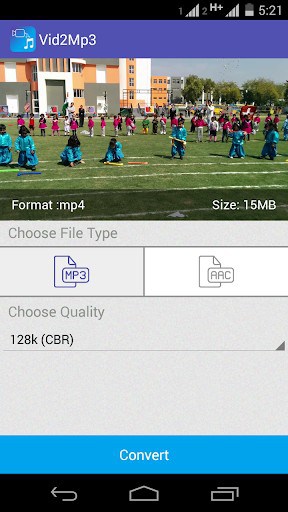
Vid2MP3 is a free Android app that converts videos to MP3 audio — extract music or sound from your video files quickly and save them for offline listening. Download the latest APK below.
Related: Video Downloader for Facebook, All Video Downloader, VidMate
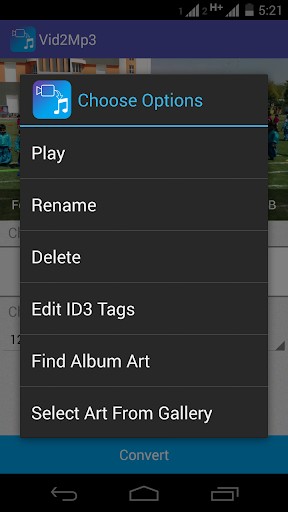
2. Supports all types of Video files
3. Edit ID3 Tags of the audio
What’s New
Crash Fixed
Additional information
Vid2Mp3 – Video To MP3
com.appfry.videotomp3
2.1
16.82 MB

One Tap Labs






Frequently Asked Questions
What is Vid2Mp3 and what does it do?
Vid2Mp3 is a free Android app that lets you extract audio from any video file on your device. You can save the extracted audio to any folder of your choice and listen to it later, making it perfect for converting videos to MP3 format.
Is Vid2Mp3 free to download and use?
Yes, Vid2Mp3 is completely free to download and use. There are no hidden charges or premium subscriptions required to access its core features.
What video and audio formats does Vid2Mp3 support?
Vid2Mp3 supports all types of video files and audio conversion formats, allowing you to convert virtually any video on your device to MP3 or other audio formats.
Can I edit metadata tags in the audio files created by Vid2Mp3?
Yes, Vid2Mp3 allows you to edit ID3 tags of the converted audio files, including adding or modifying album art, artist name, and album information.
Who developed Vid2Mp3?
Vid2Mp3 was developed by One Tap Labs. The app has been updated with crash fixes to ensure a smooth user experience.
How does Vid2Mp3 work?
Simply select a video from your device, and Vid2Mp3 will extract the audio and convert it. You can then save the audio file to any folder you choose on your device for offline listening.













Leave a Comment