
BasicSync is a simple app for running Syncthing on Android. It is intentionally kept basic, since it only controls when Syncthing runs, while all configuration is handled through Syncthing's own web UI.
Developer: chenxiaolong · License: GPL-3.0-only (open source) · Price: Free
Before you start: go to the GitHub releases page at https://github.com/chenxiaolong/BasicSync/releases, download the latest APK (v3.30), and optionally verify its digital signature as described in the project's README. Alternatively, install it from F-Droid.
Official file from the developer's release · Nov 24, 2026 · SHA-256 08c3c089972faf7c…
Screenshots
Key features
- Supports Android 8 and newer, including external storage like SD cards and USB drives
- Supports Android's storage access framework, plus importing and exporting configuration
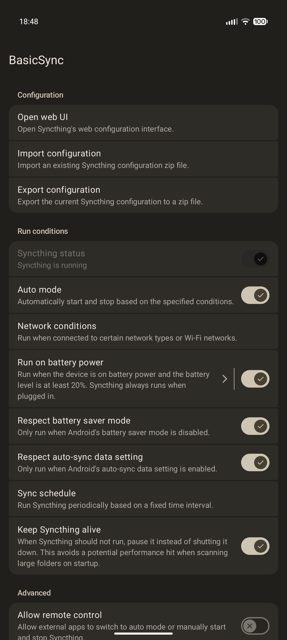
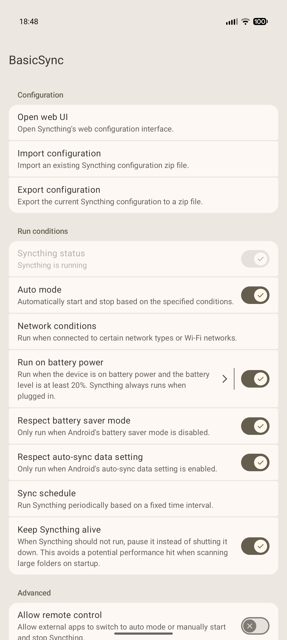
- Pauses syncing based on network and battery conditions or a periodic schedule, with a quick settings tile for automatic/manual mode
- Lets external apps start and stop Syncthing via remote control, and runs Syncthing as a library in the main process so it is immune to Android 12+ child process restrictions
- Adds a folder picker and QR code scanner to Syncthing's web UI, and detects and reports sync conflicts
Why isn’t BasicSync on Google Play?
BasicSync is published by its developer on GitHub and is also available on F-Droid, rather than on Google Play.
Is BasicSync safe?
BasicSync is open source under the GPL-3.0-only license. Download the APK from the official GitHub releases page and check the digital signature as described in the project's documentation, or install it through F-Droid. The app requests several permissions (storage, notifications, network, camera for QR scanning, and others) that are each explained in the README and tied to specific optional features. BasicSync comes straight from its developer rather than through Google Play, so it hasn’t gone through Google’s app review. As with any app, check the permissions it asks for and install it if you’re comfortable with them.
How to install
- Tap the download button above: the APK file downloads straight to your phone.
- When Android asks, allow your browser to install unknown apps.
- Open the file and tap Install.
FAQ
Is BasicSync free?
Yes. It is open source under the GPL-3.0-only license with no ads or telemetry of its own.
How do I configure Syncthing after installing BasicSync?
Open the Syncthing web UI from within the app and configure it the same way you would on a computer. BasicSync only controls when Syncthing runs.
Should I use the storage access framework (SAF) or direct file access?
The README recommends direct file access over SAF when possible, since SAF is inefficient for how Syncthing accesses files and can lead to more sync errors. GrapheneOS users are advised to use the OS-level storage scopes feature instead.
More free apps you won’t find on Google Play: Open Source Apps · Best Android apps not on the Google Play Store.






Frequently Asked Questions
Is BasicSync free?
Yes. It is open source under the GPL-3.0-only license with no ads or telemetry of its own.
How do I configure Syncthing after installing BasicSync?
Open the Syncthing web UI from within the app and configure it the same way you would on a computer. BasicSync only controls when Syncthing runs.
Should I use the storage access framework (SAF) or direct file access?
The README recommends direct file access over SAF when possible, since SAF is inefficient for how Syncthing accesses files and can lead to more sync errors. GrapheneOS users are advised to use the OS-level storage scopes feature instead.













Leave a Comment