

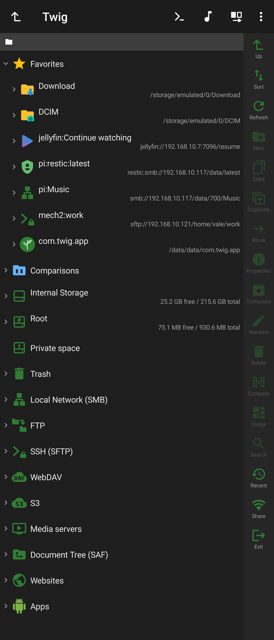
Twig is a dual-pane file manager for Android that treats every storage source, local, archives, FTP, SFTP, SMB, WebDAV, S3, restic and Jellyfin/Emby, as one expandable tree instead of a separate screen for each. People use it when they are tired of juggling different apps for local files, network shares and cloud backups, and want to copy between any two of them directly.
Developer: dev2ex · License: GPL-3.0-only (open source) · Price: Free
Before you start: if you want privileged access to protected folders (like Android/data or system directories), set up root or Shizuku first; this is optional and only needed for elevated-access features. For automatic updates outside F-Droid, install Obtainium and add the GitHub repo URL, then set an APK filter regular expression such as -full.apk$ or -libre.apk$ since each release contains several APK variants.
Official file from the developer's release · Nov 26, 2026 · SHA-256 4859367c94808312…
Screenshots
Key features
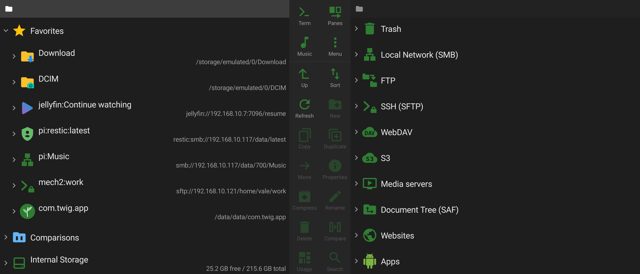
- Dual-pane browsing where local, archive, FTP, SFTP, SMB, WebDAV, S3, restic and media-server sources all expand in the same tree
- Read and write support for ZIP, 7z and tar archives, plus AES-256 encrypted zip/7z creation and read-only RAR in the full build
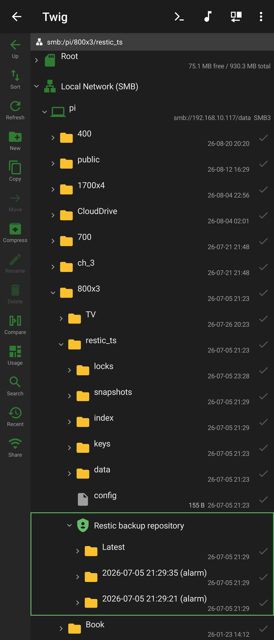
- Browse restic backups as dated snapshot folders with decryption happening on the device
- Built-in terminal (local, SSH or privileged shell) that stays linked to the directory you're browsing, with git status, history and diff support
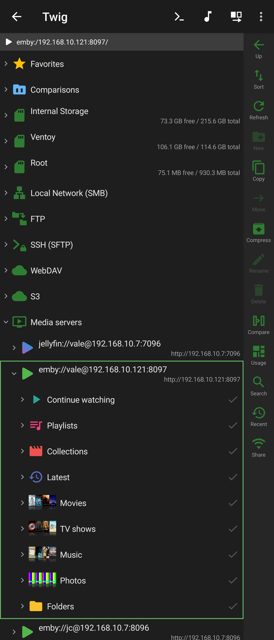
- Jellyfin and Emby libraries shown in the same tree with posters, metadata, subtitles and resumable playback
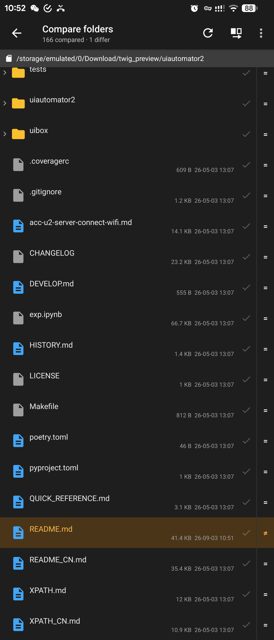
- Directory compare with incremental or mirror sync, a disk-usage treemap, and Wi-Fi sharing via a built-in HTTP/WebDAV server
Why isn’t Twig on Google Play?
Twig is published by its developer on GitHub and is also available on F-Droid; it isn't distributed on Google Play.
Is Twig safe?
Twig is fully open source under GPL-3.0, with no ads, no tracking and no data collection according to the README. GitHub releases are signed APKs from the developer, and the F-Droid build is verified through reproducible builds using the same signing key, so you can pick whichever source you trust. Twig comes straight from its developer rather than through Google Play, so it hasn’t gone through Google’s app review. As with any app, check the permissions it asks for and install it if you’re comfortable with them.
How to install
- Tap the download button above: the APK file downloads straight to your phone.
- When Android asks, allow your browser to install unknown apps.
- Open the file and tap Install.
FAQ
Is Twig free
Yes. It is open source under the GPL-3.0 license, with no ads, no tracking and no data collection, according to the README.
Which APK file should I download
If you're not sure, choose the full APK (arm64-v8a + x86_64), which includes read-only RAR support. If you want free software only, choose the libre build, which leaves out RAR because the junrar library it depends on isn't free software. Smaller single-architecture and NFS-enabled builds are also available on the GitHub releases page.
How is Twig different from a typical cloud storage or archive app
Instead of giving each storage type (archives, SFTP, SMB, S3, restic, Jellyfin, etc.) its own separate screen, Twig expands every source inside one shared folder tree, so you can copy files directly between any two sources, like an SMB share and a local archive, in a dual-pane view.
More free apps you won’t find on Google Play: Open Source Apps · Best Android apps not on the Google Play Store.






Frequently Asked Questions
Is Twig free
Yes. It is open source under the GPL-3.0 license, with no ads, no tracking and no data collection, according to the README.
Which APK file should I download
If you're not sure, choose the full APK (arm64-v8a + x86_64), which includes read-only RAR support. If you want free software only, choose the libre build, which leaves out RAR because the junrar library it depends on isn't free software. Smaller single-architecture and NFS-enabled builds are also available on the GitHub releases page.
How is Twig different from a typical cloud storage or archive app
Instead of giving each storage type (archives, SFTP, SMB, S3, restic, Jellyfin, etc.) its own separate screen, Twig expands every source inside one shared folder tree, so you can copy files directly between any two sources, like an SMB share and a local archive, in a dual-pane view.













Leave a Comment