
OwnDroid is a tool that uses Android's Device Policy Manager API, the same system used by corporate device management apps, to let you control settings on your own device. It is useful for people who want to disable features like the camera, USB, or app uninstallation without signing up to any enterprise mobile device management service.
Developer: BinTianqi · License: GPL-3.0 (open source) · Price: Free
Before you start: OwnDroid needs Device Owner access to work fully. Pick one activation method depending on your device: 1) Install Shizuku and grant OwnDroid access through it, 2) Use Dhizuku, 3) Use root and activate through the app, or 4) Connect your device to a computer and run the ADB command "dpm set-device-owner com.bintianqi.owndroid/.Receiver" in a shell. Note there can't already be a device owner set, and devices with extra accounts or extra users (work profile, private space, cloned apps) may need those removed first. ColorOS users should download the testkey version from GitHub Releases instead of the regular signed build.
Official file from the developer's release · Nov 1, 2026 · SHA-256 073b9196f54cc52c…
Screenshots
Key features
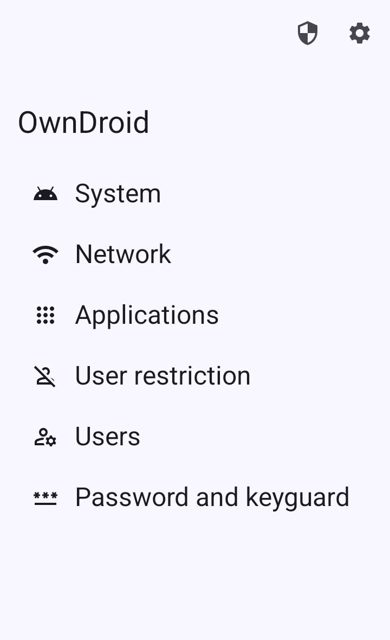
- System controls: disable camera, disable screenshots, mute master volume, disable USB signal, lock task mode, wipe data
- Network tools: add, modify or delete Wi-Fi networks, view network stats, network logging
- App management: suspend or hide apps, block app uninstallation, grant or revoke permissions, clear app storage, install or uninstall apps
- User restrictions: disable SMS, outgoing calls, Bluetooth, NFC, USB file transfer, and app installing or uninstalling
- Multi-user management: view user information, create, start, switch, stop or delete users
- Intent-based API for automating actions like hiding apps, locking the screen, or rebooting from scripts or shortcuts
Why isn’t OwnDroid on Google Play?
OwnDroid is published by its developer on GitHub and is also available through the IzzyOnDroid F-Droid repository, but it is not listed on Google Play.
Is OwnDroid safe?
OwnDroid is open source under the GPL-3.0 license, and the GitHub Releases page has official builds from the developer. Because it requests Device Owner privileges, it needs a setup step like Shizuku, root, or an ADB command before it can apply most restrictions, and ColorOS users specifically need the testkey version to avoid a provisioning error. OwnDroid comes straight from its developer rather than through Google Play, so it hasn’t gone through Google’s app review. As with any app, check the permissions it asks for and install it if you’re comfortable with them.
How to install
- Tap the download button above: the APK file downloads straight to your phone.
- When Android asks, allow your browser to install unknown apps.
- Open the file and tap Install.
FAQ
Is OwnDroid free
Yes. It is open source software released under the GPL-3.0 license and the APK is free to download from GitHub Releases or the IzzyOnDroid F-Droid repository.
Why does OwnDroid need Device Owner access
Most of its features, like disabling the camera, blocking app uninstalls, or managing users, rely on Android's DevicePolicyManager API, which only works fully when the app is set as Device Owner. You can activate this using Shizuku, Dhizuku, root, or an ADB command.
What do I do if I get an error about existing accounts or users when setting the device owner
Since version 8.4, OwnDroid tries to bypass the existing-accounts error automatically when using Shizuku or root. If you still see it, freeze or delete the account-holder apps. For the existing-users error, delete secondary users such as work profile, private space, or cloned apps.
More free apps you won’t find on Google Play: Open Source Apps · Best Android apps not on the Google Play Store.





Frequently Asked Questions
Is OwnDroid free
Yes. It is open source software released under the GPL-3.0 license and the APK is free to download from GitHub Releases or the IzzyOnDroid F-Droid repository.
Why does OwnDroid need Device Owner access
Most of its features, like disabling the camera, blocking app uninstalls, or managing users, rely on Android's DevicePolicyManager API, which only works fully when the app is set as Device Owner. You can activate this using Shizuku, Dhizuku, root, or an ADB command.
What do I do if I get an error about existing accounts or users when setting the device owner
Since version 8.4, OwnDroid tries to bypass the existing-accounts error automatically when using Shizuku or root. If you still see it, freeze or delete the account-holder apps. For the existing-users error, delete secondary users such as work profile, private space, or cloned apps.













Leave a Comment