

Couchy Launcher is a one-screen home launcher built specifically for Android TV and Google TV boxes. It is remote-controlled, works without Google Play Services, and keeps everything local instead of sending data out to the network.
Developer: conreo · License: GPL-3.0-only (open source) · Price: Free
Before you start: this is a launcher for Android TV or Google TV boxes only (it needs the "leanback" feature and won't install on phones or tablets). You'll need ADB debugging enabled on the TV. Go to Settings → System → About and tap the Android TV OS build item 7 times, then Settings → System → Developer options and turn on USB or Wireless debugging. Then from a computer run: adb connect <tv-ip>:5555 followed by adb install -r couchy-launcher.apk. On certified Google TVs, Google blocks the on-screen home picker, so you set Couchy as default with: adb shell cmd package set-home-activity com.conreo.couchytv/.MainActivity. The app's built-in setup wizard walks through this too, with your TV's IP pre-filled.
Official file from the developer's release · Aug 1, 2026 · SHA-256 9d065bbefada54ea…
Screenshots
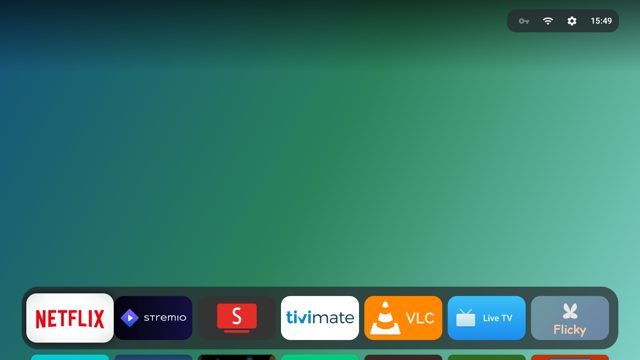
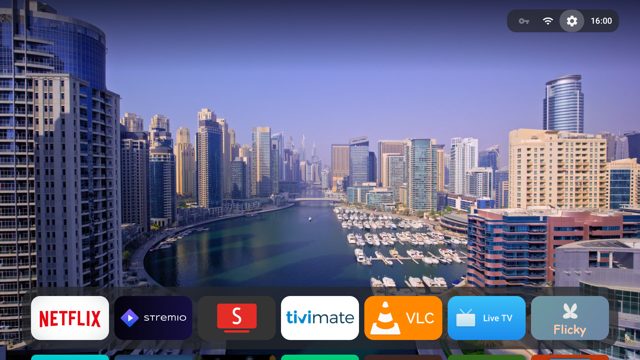
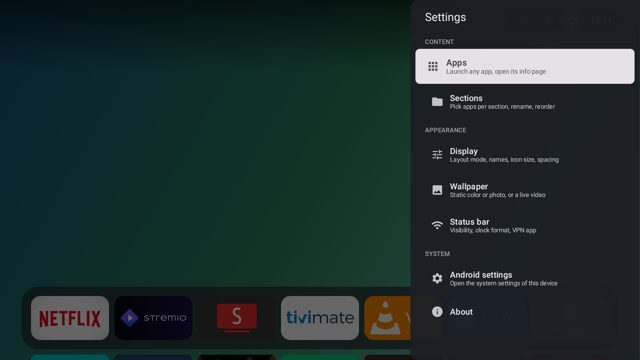
Key features
- Three layouts to choose from: Carousel, Grid, or a floating glass Dock (press Down to expand it)
- Sections you can rename, reorder and fill with apps, with new installs going to the first section
- Wallpaper options: gradients, your own photo, a looping local video, or optional streamed aerial videos
- Save and load your whole setup (categories, layout, wallpaper, settings) as a JSON file
- 18 languages with a language picker in the launcher settings, plus adjustable icon size, spacing, corner roundness and more
Why isn’t Couchy Launcher on Google Play?
Couchy Launcher is published by its developer on GitHub and is also available on F-Droid; it is not distributed on Google Play.
Is Couchy Launcher safe?
The app is open source under the GPL-3.0 license, and the APK is the developer's own release, also mirrored on F-Droid. By default it makes no network requests at all; the only exception is the optional aerial wallpaper feature, which is off by default and, when turned on, streams video from Apple and Amazon CDNs (no account or private data involved). Couchy Launcher comes straight from its developer rather than through Google Play, so it hasn’t gone through Google’s app review. As with any app, check the permissions it asks for and install it if you’re comfortable with them.
How to install
- Tap the download button above: the APK file downloads straight to your phone.
- When Android asks, allow your browser to install unknown apps.
- Open the file and tap Install.
FAQ
Is Couchy Launcher free?
Yes. It is free and open source under the GPL-3.0 license. The developer also has an optional Buy Me a Coffee link if you want to support the project.
How do I make Couchy Launcher my default home screen?
On generic Android TV or AOSP boxes, press Home, pick Couchy Launcher and choose Always. On certified Google TV devices, Google blocks the on-screen picker, so you need one ADB command instead: adb shell cmd package set-home-activity com.conreo.couchytv/.MainActivity. If a stock launcher keeps taking over, the README explains how to find and disable it with adb shell pm disable-user.
Does Couchy Launcher need Google Play Services or an internet connection?
No. It has no dependencies, no companion app, and runs on AOSP boxes without Google Play Services. It makes no network requests by default; the only optional network use is the aerial video wallpaper feature, which you have to turn on yourself.
More free apps you won’t find on Google Play: Open Source Apps · Best Android apps not on the Google Play Store.





Frequently Asked Questions
Is Couchy Launcher free?
Yes. It is free and open source under the GPL-3.0 license. The developer also has an optional Buy Me a Coffee link if you want to support the project.
How do I make Couchy Launcher my default home screen?
On generic Android TV or AOSP boxes, press Home, pick Couchy Launcher and choose Always. On certified Google TV devices, Google blocks the on-screen picker, so you need one ADB command instead: adb shell cmd package set-home-activity com.conreo.couchytv/.MainActivity. If a stock launcher keeps taking over, the README explains how to find and disable it with adb shell pm disable-user.
Does Couchy Launcher need Google Play Services or an internet connection?
No. It has no dependencies, no companion app, and runs on AOSP boxes without Google Play Services. It makes no network requests by default; the only optional network use is the aerial video wallpaper feature, which you have to turn on yourself.













Leave a Comment