

BYDMate is a companion app for BYD DiLink head units that reads real energy consumption straight from the car's BMS instead of relying on the dashboard computer, which tends to understate usage. People use it to log trips and charges, automate car functions, get offline AI driving insights, and add features like a navigation HUD and blind-spot cameras that the stock system does not offer.
Developer: AndyShaman · License: NOASSERTION (open source) · Price: Free
Before you start: this app is made for BYD cars with DiLink 3.0, 4.0, 5.0, or 5.1 (including UI7 firmware). It has been tested on the Leopard 3 (Fangchengbao 3) and is said to also support Sea Lion 07, Song, Song Pro DM-i, Atto 3, Leopard 5, Leopard 8, Sea Lion 06, Seal, and Han, covering both EVs and DM-i/DM-o hybrids. Download the APK from the GitHub Releases page and install it on the car's head unit.
Official file from the developer's release · Nov 20, 2026 · SHA-256 cdff6738c982a629…
Screenshots
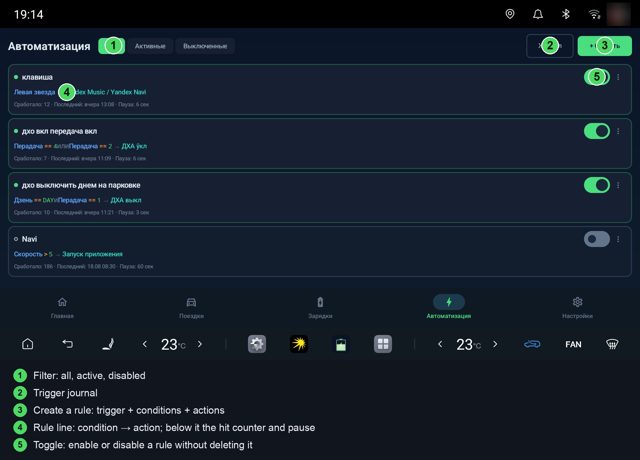
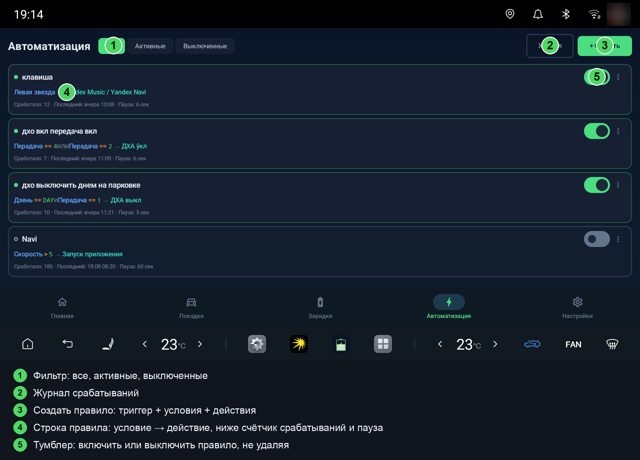
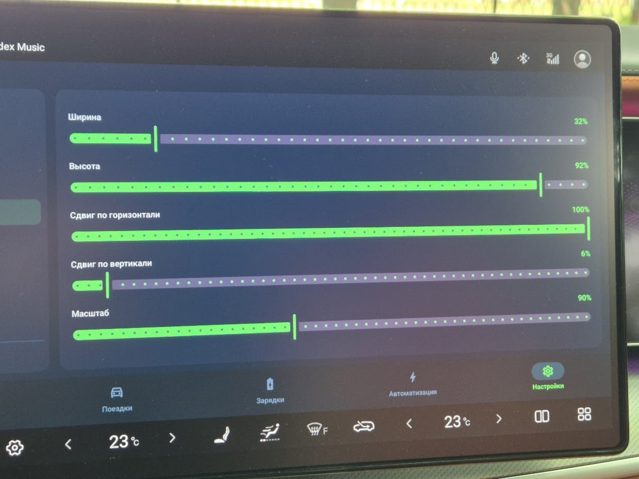
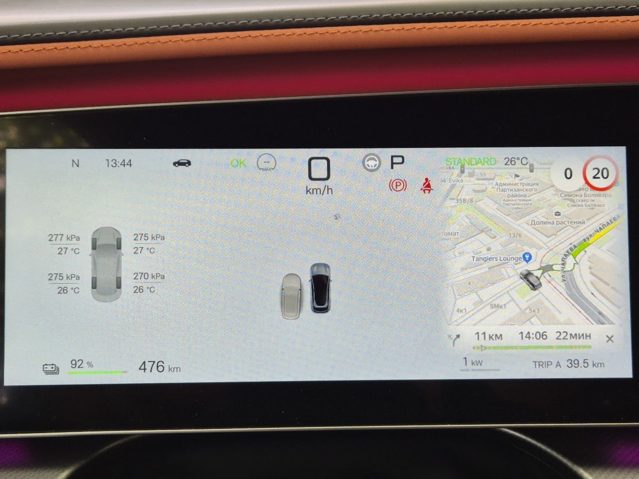
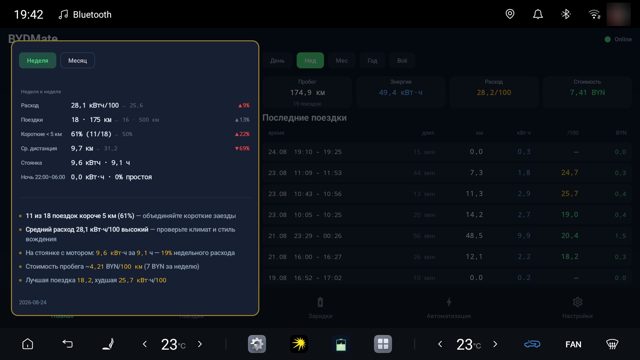
Key features
- Real consumption readings pulled from the BMS (energydata), not the stock trip computer
- Trip and charge logging with GPS routes, costs, and automatic AC/DC charge detection
- Split screen (1/3 + 2/3), navigation on the instrument cluster, and Yandex Navigator directions on the HUD
- Blind-spot camera display triggered by the turn signal, shown on the cluster or in an on-screen window
- Russian-language offline voice AI agent with over 30 tools, plus rule-based automation (WHEN -> THEN) and ABRP telemetry
Why isn’t BYDMate on Google Play?
It is published by its developer on GitHub rather than Google Play; it is not listed on F-Droid either.
Is BYDMate safe?
This is an open-source project (license listed on GitHub as PolyForm Noncommercial, though the metadata here shows NOASSERTION) and the APK comes from the developer's own GitHub releases. The app can control real car functions (windows, locks, climate, lights, and more) within a documented safety list and speed limits, and it explicitly avoids touching brakes, steering, cruise control, ADAS, or airbags; some settings it changes on the head unit (like the cluster output mode or disabling the stock voice assistant) need to be manually reverted before uninstalling, since the app cannot undo them afterward. BYDMate comes straight from its developer rather than through Google Play, so it hasn’t gone through Google’s app review. As with any app, check the permissions it asks for and install it if you’re comfortable with them.
How to install
- Tap the download button above: the APK file downloads straight to your phone.
- When Android asks, allow your browser to install unknown apps.
- Open the file and tap Install.
FAQ
Is BYDMate free to use
The README does not state a price for the app itself. Its license is listed as PolyForm Noncommercial on the GitHub badge, while the repository metadata here shows the license as NOASSERTION, so check the LICENSE file in the repo for current terms.
Does it need an internet connection to work
No. The README says the main features (trips, charges, automations, local insights, offline voice agent) run locally on the DiLink unit and do not need internet. Cloud features are off by default and only turn on if you manually enter a key.
Can BYDMate control safety systems like brakes or ADAS
No. The README states the app has no commands for brakes, steering, cruise control, driver assistance (ADAS), or airbags, and those systems work the same with or without the app installed.
More free apps you won’t find on Google Play: Open Source Apps · Best Android apps not on the Google Play Store.






BYDMate old versions (APK)
Earlier releases, if the latest one gives you trouble. Same developer, same signature, scanned by VirusTotal.
All versions listed here need Android 10 or later, the same as the current release. Use an older one if the latest update causes problems on your phone. Each BYDMate old version APK here is the original file, signed with the same key as the current version, and passed a VirusTotal scan before we listed it.
Installing an older version? Uninstall BYDMate first. Android can't install an older version over a newer one, and uninstalling deletes the app's data on your phone.
Frequently Asked Questions
Is BYDMate free to use
The README does not state a price for the app itself. Its license is listed as PolyForm Noncommercial on the GitHub badge, while the repository metadata here shows the license as NOASSERTION, so check the LICENSE file in the repo for current terms.
Does it need an internet connection to work
No. The README says the main features (trips, charges, automations, local insights, offline voice agent) run locally on the DiLink unit and do not need internet. Cloud features are off by default and only turn on if you manually enter a key.
Can BYDMate control safety systems like brakes or ADAS
No. The README states the app has no commands for brakes, steering, cruise control, driver assistance (ADAS), or airbags, and those systems work the same with or without the app installed.













Leave a Comment