

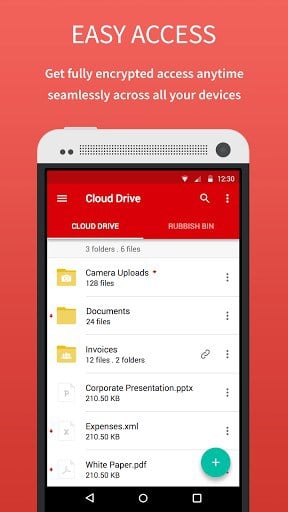


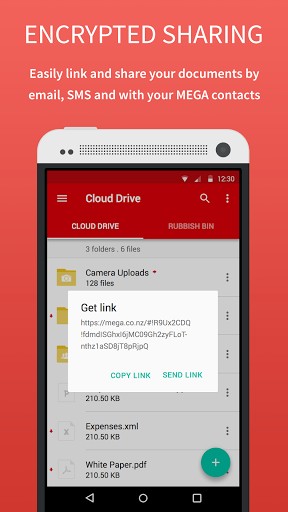
Upload your files from your smartphone or tablet then search, store, download, stream, view, share, rename or delete your files any time, from any device, anywhere. Share folders with your contacts and see their updates in real time.
The encryption process means we cannot access or reset your password so you MUST remember it (unless you have your Master Key backed up) or you will lose access to your stored files.
Inside the app you can upgrade your storage space & bandwidth quota with a monthly or yearly subscription.
PRO LITE subscription: 4.99 € per month or 49.99 € per year gives you 200 GB of storage space and 1 TB of bandwidth per month.
PRO I subscription: 9.99 € per month or 99.99 € per year gives you 500 GB of storage space and 2 TB of bandwidth per month.
PRO II subscription: 19.99 € per month or 199.99 € per year gives you 2 TB of storage space and 4 TB of bandwidth per month.
PRO III subscription: 29.99 € per month or 299.99 € per year gives you 4 TB of storage space and 8 TB of bandwidth per month.
Subscriptions are renewed automatically for successive subscription periods of the same duration and at the same price as the initial period chosen. To manage your subscriptions, simply click on the Play Store icon on your handset, sign in with your Google ID (if you haven't already done so) and then click on the MEGA app. You'll be able to manage your subscription there.
App Permissions:
WRITE_EXTERNAL_STORAGE -> Download your files from MEGA to your device and upload files from your device to MEGA
CAMERA -> Take a picture and upload your photos to MEGA
READ_CONTACTS -> Easily add contacts from your device as MEGA contacts
Our source code is now public: https://github.com/meganz/android
For more info, please check our website:
Mobile https://mega.nz/mobile_terms.html https://mega.nz/mobile_privacy.html
Desktop – https://mega.nz/
New Terms of Service apply effective from 20 February 2016. See https://mega.nz/TermsOfService2016.pdf
Note: For desktop access to your files Mega needs to use HTML5 compatible browsers to handle our advanced features. We recommend Mozilla Firefox and Google Chrome. However the mobile versions of browsers cannot access the Mega cloud storage system.
What’s New
3.0.12.4
Minor bugs fixed
Performance improvements
3.0.12.3
Import folder links
UI improvements
Several bugs solved
3.0.12.2
Minor bugs solved
3.0.12.1
Android 4.0-4.3 SD card access solved
Minor bugs fixed
3.0.12
Material design integration for <= Android 4.4.4
Solving several bugs
3.0.11.5
Several bugs solved
If you find any bug, please contact us to [email protected] or [email protected]
Additional information
MEGA
mega.privacy.android.app
3.0.12.4
12.99 MB
10,000,000+ downloads
Mega Ltd




Frequently Asked Questions
Is MEGA APK safe to download and use?
Yes, MEGA is a secure cloud storage service where your data is encrypted and decrypted only on your client devices, not on MEGA's servers. This means MEGA cannot access your files. The app's source code is publicly available for transparency. However, remember that the encryption means MEGA cannot reset your password, so you must keep it safe or have your Master Key backed up to avoid losing access to your files.
How do I download MEGA app on Android?
You can download the MEGA app from Google Play Store by searching for 'MEGA' or visiting the MEGA app page. Simply tap Install, and the app will download and install on your Android device. Once installed, create an account or log in to start using the service.
Is MEGA app free to download and use?
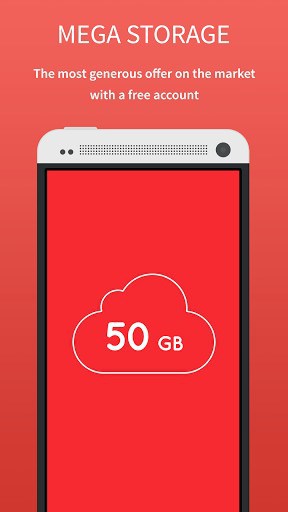
Yes, MEGA is free to download and use. The app comes with 50 GB of free cloud storage space included. Optional paid subscriptions are available if you need more storage and bandwidth, ranging from 4.99 € per month for PRO LITE (200 GB storage) up to 29.99 € per month for PRO III (4 TB storage).
What Android version do I need to run the MEGA app?
The post content does not specify the minimum Android version requirement for the MEGA app. You should check the Google Play Store listing for your device to confirm compatibility before downloading.
What features does MEGA app offer on Android?
MEGA allows you to upload files from your smartphone or tablet, search, store, download, stream, view, share, rename, and delete files from any device. You can share folders with contacts and see their updates in real time. The app also supports file uploads via camera, easy contact management, and automatic subscription management through Google Play.
Can I find MEGA on Google Play Store?
Yes, MEGA is available on Google Play Store. You can manage your subscriptions directly through the Play Store app by signing in with your Google ID and accessing the MEGA app settings.
Leave a Comment