

Kiosk Satellite turns an Android phone or tablet into a dedicated display for Home Assistant, complete with voice control, music playback and photo screensavers. It is built specifically for Home Assistant users who want a proper wall-mounted or counter-top dashboard instead of a general-purpose browser kiosk app.
Developer: jxlarrea · License: NOASSERTION (open source) · Price: Free
Before you start: you need Android 7.0 or newer, a reachable Home Assistant instance, and a long-lived access token from Home Assistant Profile → Security → Long-lived access tokens.
Official file from the developer's release · Nov 7, 2026 · SHA-256 6c942c8f3b1fc86f…
Screenshots
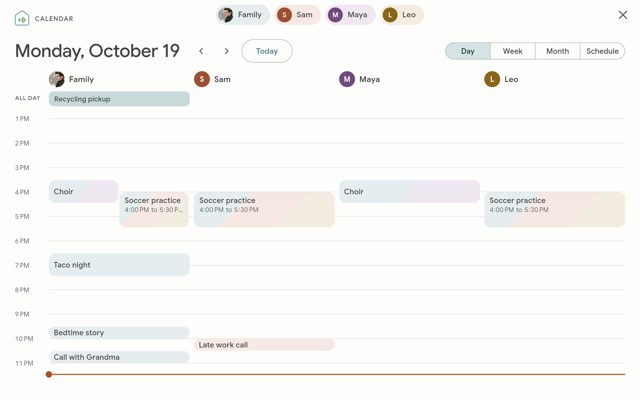
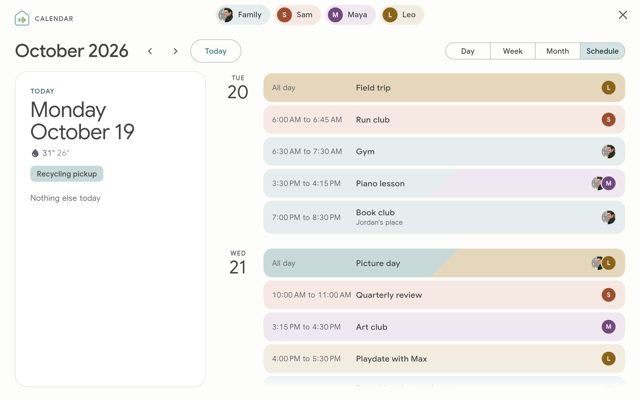
Key features
- <
- i
- t
- e
- m
Why isn’t Kiosk Satellite on Google Play?
Kiosk Satellite is published by its developer on GitHub and distributed from its own homepage, not through Google Play.
Is Kiosk Satellite safe?
The app's license is CC BY-NC-ND 4.0, free for personal, non-commercial use, with the source and release builds published on the developer's GitHub repo. Commercial use and redistribution of modified builds are not allowed, and the app asks for permissions tied to its kiosk, camera and microphone features, so review these during setup.
How to install
- Tap the download button above: the APK file downloads straight to your phone.
- When Android asks, allow your browser to install unknown apps.
- Open the file and tap Install.
FAQ
Is Kiosk Satellite free?
Yes, it is free for personal, non-commercial use. Commercial use of the app and redistribution of modified builds are not permitted under its license.
How do I set it up with Home Assistant?
Install the APK, open the app and follow the setup wizard to connect to your Home Assistant instance and pick a dashboard. You can also turn on Remote Administration in the first setup step and finish configuration from a browser at http://<device-ip>:2324.
How do I add voice control in Home Assistant?
Leave Voice Satellite enabled in the setup wizard, then go to Settings > Devices & services in Home Assistant, where the kiosk shows up as a discovered device to add.
More free apps you won’t find on Google Play: Open Source Apps · Best Android apps not on the Google Play Store.




Frequently Asked Questions
Is Kiosk Satellite free?
Yes, it is free for personal, non-commercial use. Commercial use of the app and redistribution of modified builds are not permitted under its license.
How do I set it up with Home Assistant?
Install the APK, open the app and follow the setup wizard to connect to your Home Assistant instance and pick a dashboard. You can also turn on Remote Administration in the first setup step and finish configuration from a browser at http://<device-ip>:2324.
How do I add voice control in Home Assistant?
Leave Voice Satellite enabled in the setup wizard, then go to Settings > Devices & services in Home Assistant, where the kiosk shows up as a discovered device to add.













Leave a Comment