

Group Play
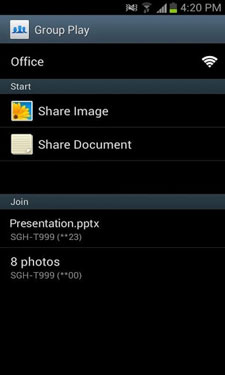
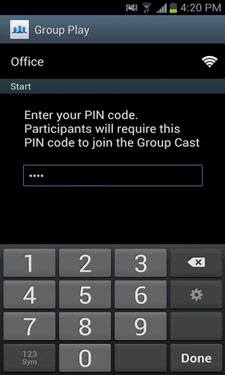
Share with groups like never before with Group Play on your Samsung Galaxy device. Group Play allows you to share your screen with a group of friends in real-time. No more crowding around a single screen – now everyone can look at the same photos or presentation together, but from their own device. Whether it’s sharing photos with your friends at a coffee shop or making an impromptu “elevator pitch” business presentation, Group Play makes sharing across mobile devices easier than ever before. You can even use it to listen to music together from your own device and headphones ? now you can be the DJ at your late night study sessions. Whatever the sharing scenario, Group Play has you covered… Easy: It is removes barriers to sharing across mobile devices. It’s quick and easy. All you need is to be connected to the same Wi-Fi network. Flexible: Group Play is supported on a number of Samsung flagship devices, including Galaxy S III, Galaxy Note II, Galaxy Tab 10.1, and Galaxy Note 10.1. Supported file types include photos (jpeg, gif), documents (ppt, pdf), music (mp3). Powerful: Up to 10 participants can join a single sharing session. Secure: A PIN code allows you to protect your session so only trusted individuals can join your session.
CURRENT VERSION : 1.5.59
REQUIRES ANDROID : 4.0 and up






Frequently Asked Questions
What is Group Play and how does it work?
Group Play is a Samsung app that lets you share your screen with a group of friends in real-time over Wi-Fi. Instead of crowding around one device, everyone can view the same photos, documents, or presentation from their own Samsung Galaxy device. You can also listen to music together using your own headphones.
Is Group Play free to download?
Yes, Group Play is a free app available for Samsung Galaxy devices. There are no subscription fees or in-app purchases required to use the sharing features.
Which Samsung devices support Group Play?
Group Play is supported on Samsung flagship devices including Galaxy S III, Galaxy Note II, Galaxy Tab 10.1, and Galaxy Note 10.1. The app requires Android 4.0 and up to run.
What file types can I share with Group Play?
Group Play supports sharing photos (jpeg, gif), documents (ppt, pdf), and music (mp3) files across your group's connected devices.
How many people can join a Group Play session?
Up to 10 participants can join a single Group Play sharing session. You can protect your session with a PIN code so only trusted individuals can join.
What are the requirements to use Group Play?
All participants need to be connected to the same Wi-Fi network to use Group Play. Your device must be a supported Samsung Galaxy device running Android 4.0 or higher.
7 edge ekt wda na bro not working 7 edge howto fix
very nice pic
don’t work with S5 mini (sm-g800f)
Hi, I have a galaxy note 10.1 version 4.1.2 and it says that is not compatible with my device, can you give me a solution? Thank you
How can i install a group to a korean made note 3 i dont if its legit but i want it on my phone.thanks!
It very useful for those android devices that cant update software to 4.2!Also for my phone (s3 mini).