

Microsoft Launcher APK — Latest version: v6.241002.0.11160220 · Oct 12, 2026
Arrow Launcher is Microsoft’s free, productivity-focused Android launcher that automatically organises your home screen into clean, swipeable pages — frequent apps, contacts, notes and reminders. It is lightweight and great if you want a tidier, smarter home screen. Explore more launchers and personalization apps.
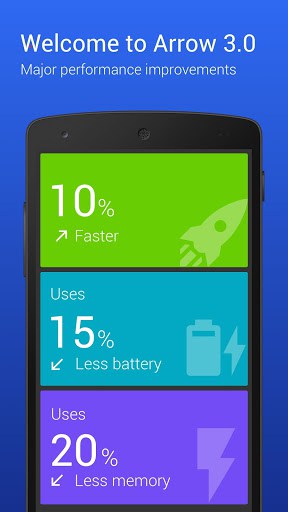
• Arrow is 10% faster
• Uses 15% less battery
• Uses 20% less memoryNew in v3.0! Brand-new utility page. Pin utility “cards” as individual pages, or customize to your heart’s content.
Productivity meets style. Arrow is the personal launcher from Microsoft Garage that offers a radical simplification of the Android experience. Arrow is lightweight, fast and efficient.
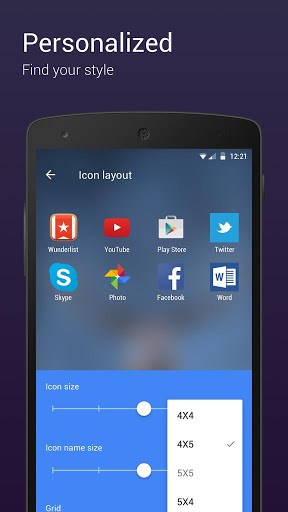
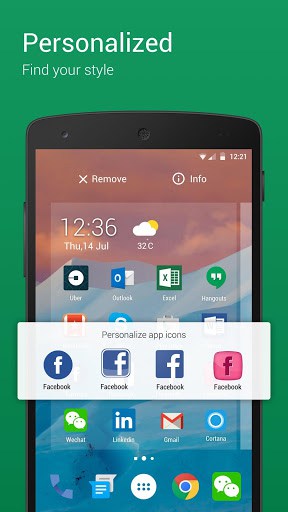
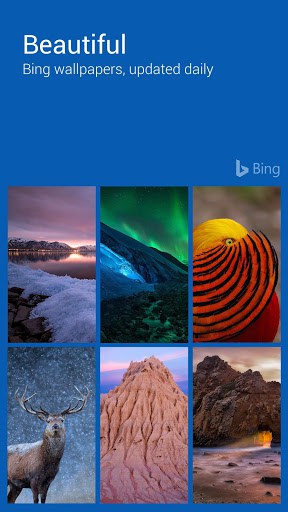
With Arrow, you can personalize your device so that it matches your style. Customize icon packs, home page layouts, wallpapers, and more. With the Bing wallpaper of the day feature, you will have a fresh new look every day.
Arrow makes it easy to find your favorite apps, keep in touch with friends, and stay on top of the important things in your life.
Arrow is available worldwide and is translated into all major languages.
“Astonishingly good” –Android Central“The best Android launcher just got better” –Thurrott.com
“Knows you better than you know yourself” –Android PIT
FEATURES
• Apps: The ultimate in customization. Arrange apps to your heart’s content, or have your apps ranked based on daily usage.
• Recent activity: Quickly get back to your recent activity: phone calls, text messages, photos, file downloads, and app installs. Every important action is just a tap away.
• People: No more hunting around your phone contact list. Easily find and contact the people who matter the most.
• Reminders: Never forget anything again. With Wunderlist integration, access your reminders everywhere on your PC, on the Web, and on your phone.
• Documents: Access your most important Office documents on the cloud, and easily share them with friends.
JOIN THE REVOLUTION
Join the Beta community movement: http://aka.ms/arrowbeta
Give us your feedback: [email protected]
ABOUT ARROW
Arrow is a Microsoft Garage Project brought to you by the creators of Next Lock Screen, the ultimate productivity lock screen. The Microsoft Garage turns fresh ideas into real projects. Learn more about The Garage at: http://microsoft.com/garage
TERMS OF USE
By installing this app, you agree to the Terms of Use (go.microsoft.com/fwlink/?LinkID=246338) and Privacy Policy (go.microsoft.com/fwlink/?LinkID=248686).
What’s New
Welcome to v3.2 of Arrow!
What’s New:
– Apps page: Hide icon title; lock App & Widget position; moveable app draw icon (as shortcut widget); add blank apps page
– DateTime widget: show next alarm time; support multiple cities weather
– Setting: Introduce new features with video snippet
– Document: support PDF format
Thank you for your ongoing support of Arrow!
Additional information
Arrow Launcher
com.microsoft.launcher
3.2.0.31695
7.99 MB
5,000,000+ downloads
Microsoft Corporation
App details
| Developer | Microsoft Corporation |
|---|---|
| Version | 6.241002.0.11160220 |
| Size | 61 MB |
| Content Rating | Everyone |
| Installs | 50M+ |
| Rating | 4.7 / 5 (1,742,672 reviews) |
| Updated | Oct 12, 2026 |
Screenshots


What makes Microsoft Launcher stand out
Microsoft Launcher has 50M+ installs to date. That puts it among the more widely adopted apps in its category. Scale at that level usually signals stable performance and a responsive development team. The 4.7-star aggregate is built on 1,742,672 real user reviews. That sits well above the average for the personalization app genre. Scores like this appear when a product hits its core promise consistently.
Microsoft Launcher specifications and compatibility
The current build is version 6.241002.0.11160220. The developer last updated it on Oct 12, 2026. The download size is 61 MB. That installs quickly even on a moderate mobile connection. Google Play classifies the content as Everyone.
Frequently asked questions
Is Microsoft Launcher free to download?
Yes, Microsoft Launcher is available as a free download on Google Play and as a free APK on this page. The APK is the official, unmodified build pulled directly from the developer.
How many people have downloaded Microsoft Launcher?
Microsoft Launcher has been downloaded 50M+ times from Google Play, putting it among the more widely adopted personalization apps in its category.
Is the Microsoft Launcher APK safe to install?
Yes. The APK on this page is the original, unmodified build from Microsoft Corporation, pulled directly from the Google Play Store with no third-party modifications. It carries the Everyone content rating Google assigns on Play.
How big is the Microsoft Launcher APK?
The Microsoft Launcher APK is 61 MB in size, which downloads quickly on most mobile and Wi-Fi connections.
What is the latest version of Microsoft Launcher?
The current build of Microsoft Launcher is version 6.241002.0.11160220, last updated by the developer on Oct 12, 2026. This page automatically tracks new releases as the developer ships them.
Related launchers





Frequently Asked Questions
What is Arrow Launcher?
Arrow Launcher is a free Android launcher (home-screen replacement) that keeps your home screen organised into simple swipeable pages for apps, people and notes. You install it, set it as your default home app, and it changes how your home screen, app drawer and icons look and work.
Is Arrow Launcher free to download?
Yes. Arrow Launcher is free to download and use, and the APK on this page is the original, unmodified build.
Is the Arrow Launcher APK safe to install?
Yes. The APK on this page is the original, unmodified Arrow Launcher build. As with any launcher, install from a trusted source and review the permissions it requests.
How do I set Arrow Launcher as my default launcher?
Install Arrow Launcher, open it once, then press the home button and select Arrow Launcher as your default home app. You can switch back to your previous launcher anytime in Android settings.
Does Arrow Launcher work on my Android phone?
Arrow Launcher works as a standard launcher on most modern Android phones and tablets. Performance may vary on older or low-memory devices.
Hello guys. This is possibly the best launcher I’ve ever used. It brings what you really need from the phone to your hands. I need more from that garage, he he.