

Vela Maps is an open-source navigation app that combines open map data with optional Google lookups, so you get turn-by-turn directions and live traffic without needing Google Play Services or a Google account. It's built for degoogled phones like GrapheneOS but also runs on regular Android.
Developer: PimpinPumpkin · License: GPL-3.0 (open source) · Price: Free
Official file from the developer's release · Oct 19, 2026 · SHA-256 f168bc730568b98e…
Screenshots
Key features
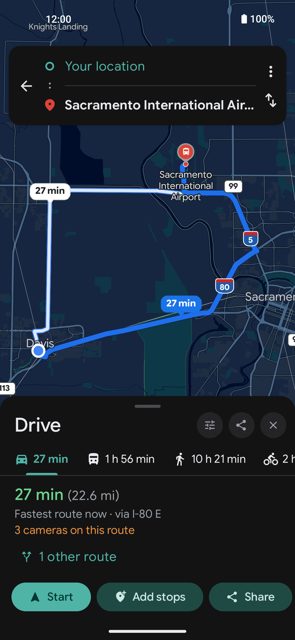
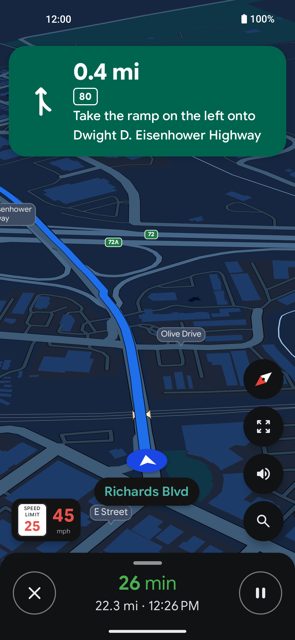
- Driving routes and live traffic pulled from Google, with turn-by-turn navigation, lane diagrams, exit shields and a speedometer
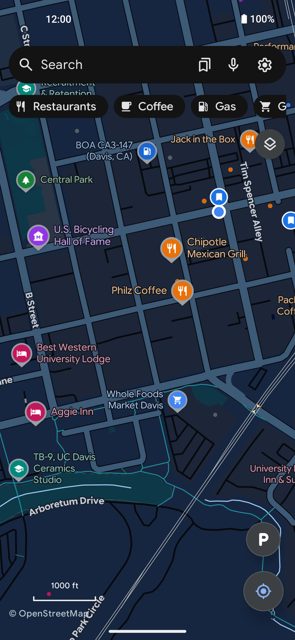
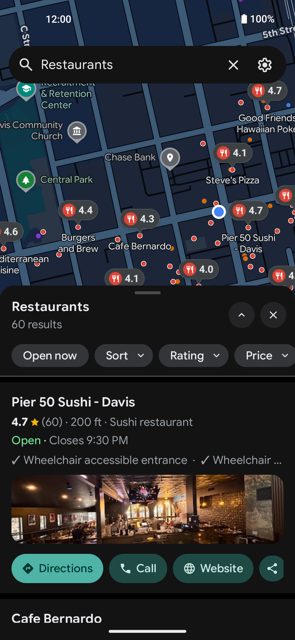
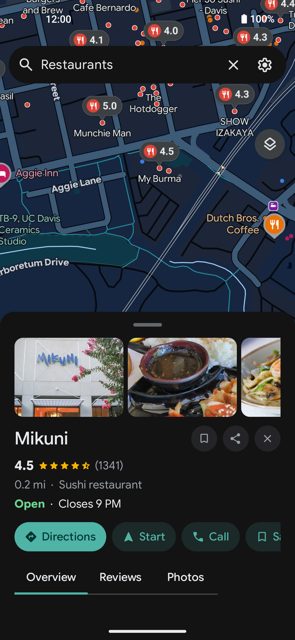
- Map places drawn from open data (Overture Maps and AllThePlaces positioned with OpenStreetMap), with optional Google lookups for hours, reviews and photos
- No Play Services, no account, no API key and no ads; saved places and history stay on the phone
- Flock camera (license plate camera) locations shown on the map, with an option to route around them
- Offline maps: download a region for map, search, places and turn-by-turn routing with no signal
- Vela Voice: on-device neural text-to-speech for directions and on-device speech-to-text for search
Why isn’t Vela Maps on Google Play?
Vela is published by its developer on GitHub (and offers its own F-Droid-compatible repo) rather than on Google Play.
Is Vela Maps safe?
Vela is open source under the GPL-3.0 license. Download the APK from the official GitHub Releases page or use Obtainium, and verify the APK signature (SHA-256 fingerprint is published in the README) before installing. The app is in beta, so expect some bugs, and note that some features (driving routes, place details, search suggestions) send anonymous requests to Google's public endpoints unless you enable "Use Vela without Google" in Settings.</safe>
<parameter name="before">Before you start: pick the right APK for your phone. Most phones should use vela-maps-arm64.apk from the GitHub Releases page; vela-maps-all.apk works on any device. If you prefer automatic updates, install Obtainium and add the Vela GitHub repo, or add Vela's own F-Droid repo (https://pimpinpumpkin.github.io/Vela/repo) to an F-Droid client. After installing, you can check the APK's signature against the SHA-256 fingerprint listed in the README using apksigner or the App Verifier app. Vela Maps comes straight from its developer rather than through Google Play, so it hasn’t gone through Google’s app review. As with any app, check the permissions it asks for and install it if you’re comfortable with them.
How to install
- Tap the download button above: the APK file downloads straight to your phone.
- When Android asks, allow your browser to install unknown apps.
- Open the file and tap Install.
FAQ
Is Vela Maps free
Yes. It's free and open source under the GPL-3.0 license. The developer accepts optional support through Buy Me a Coffee.
Does Vela Maps need a Google account or Play Services
No. Vela runs with no Google account, no Play Services and no API key. Panning the map and browsing never contacts Google at all; only specific actions like asking for a driving route or tapping a place send an anonymous request to Google's public endpoints, and you can turn this off entirely in Settings with 'Use Vela without Google'.
How is Vela Maps different from the Google Maps app
Vela draws its base map and places from open data (OpenStreetMap, Overture Maps and AllThePlaces) and only reaches out to Google for things open data doesn't cover well, like live traffic, reviews, photos and business hours. There's no Google code, account or tracking involved, and everything you save stays on your phone.
Does Vela Maps work offline
Yes. You can download a region (a city, state or country, or just the area on screen) and use the map, search, saved places and turn-by-turn navigation with no network connection.
More free apps you won’t find on Google Play: Open Source Apps · Best Android apps not on the Google Play Store.






Frequently Asked Questions
Is Vela Maps free
Yes. It's free and open source under the GPL-3.0 license. The developer accepts optional support through Buy Me a Coffee.
Does Vela Maps need a Google account or Play Services
No. Vela runs with no Google account, no Play Services and no API key. Panning the map and browsing never contacts Google at all; only specific actions like asking for a driving route or tapping a place send an anonymous request to Google's public endpoints, and you can turn this off entirely in Settings with 'Use Vela without Google'.
How is Vela Maps different from the Google Maps app
Vela draws its base map and places from open data (OpenStreetMap, Overture Maps and AllThePlaces) and only reaches out to Google for things open data doesn't cover well, like live traffic, reviews, photos and business hours. There's no Google code, account or tracking involved, and everything you save stays on your phone.
Does Vela Maps work offline
Yes. You can download a region (a city, state or country, or just the area on screen) and use the map, search, saved places and turn-by-turn navigation with no network connection.













Leave a Comment