
With increasing privacy concerns with social media platforms, such as Facebook, Instagram, and Twitter, many are moving off them. While at one point in time, Instagram and other social media platforms were at their peak, leaving it was unheard of. With the rise in privacy issues, more and more people are deactivating their accounts to protect their privacy and stay safe. For detailed procedure on how you can delete, deactivate, and reactive your Instagram account, read on.
Research tells us that sharing photos online is one of the most harmful things you can do on social media. So, imagine the effects of using a platform that is almost exclusively used for sharing photos and videos. Besides privacy and security, it could impact the mental health of young users and even instil a feeling of low self-esteem and being inadequate. Instagram has been designed excellently and is known for keeping the users addicted to scrolling on for hours!
It may interest you to know that the platform recently launched a new time limit tool to restrict your experience and usage. Instagram has also started letting the users upload videos that are up to an hour in length. Since this platform is owned by Facebook, and Facebook has been at the centre of a variety of privacy-related issues, many users have become wary of using Instagram as well. With its data policies and practices becoming public, users have started moving away from using it.
If you don’t want to use Instagram anymore, there are two ways to deal with this –
- You could either deactivate your Instagram account. This is not a permanent measure. When you do this, your photos, comments, likes, and profile will be hidden. If or when you decide to activate and start using your account again, you would be able to regain access to everything.
- The second option is to delete your Instagram account. This is a permanent option. When you select this, your entire profile, including your photos, likes, videos, and comments will all go away and can never be retrieved again. One thing to note here is that you would not be able to use the same username again. One would have to create a new username and a new account in order to start using the platform.
How to Delete Your Instagram Account Permanently ?
This section will go through the process required to permanently delete your Instagram account.
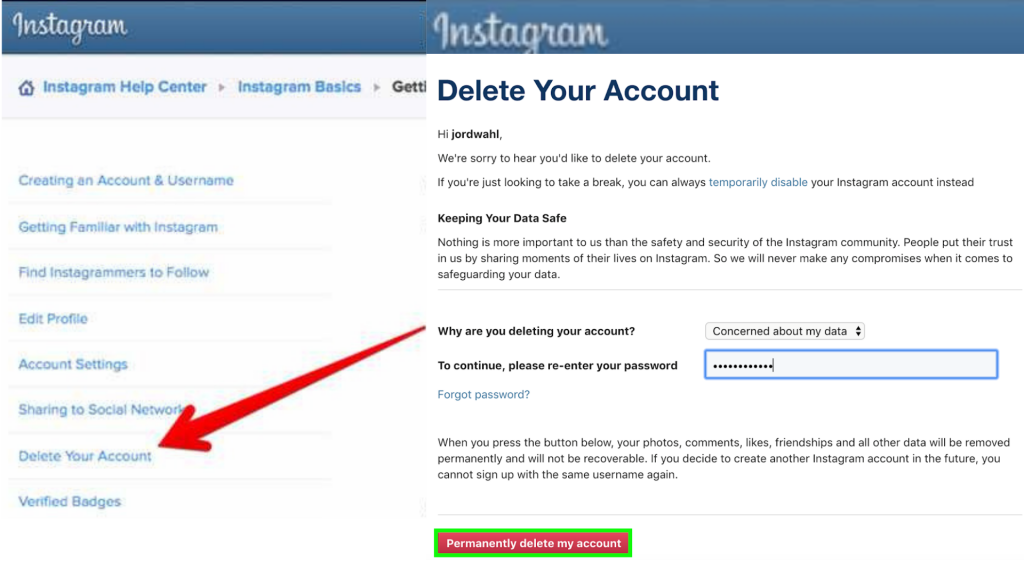
- Log in to your Instagram account using your credentials. Since you cannot delete your account from the app, you will have to log in to their website – www.instagram.com.
- Within the settings, go to the ‘Delete Your Account’ page. You will be able to choose the reason for deleting your account under the ‘Why are you deleting your account?’ drop-down menu.
- You will be asked to enter your password. You will have to confirm that you do want to delete your account.
- Click on the ‘Permanently delete my account’. Once done, all your photos and other content will be disabled.
How to deactivate Instagram account?
If you don’t want to permanently delete your account, there is a way to temporarily part with it. You can do so by deactivating the account. You can always reactivate it when you want to get back again.
We will cover that later on in this article as well. You would even be able to download all your online data, such as comments, likes, and of course, your photos, as a keepsake, if you choose to not return! Check out the steps detailed below for a better idea.
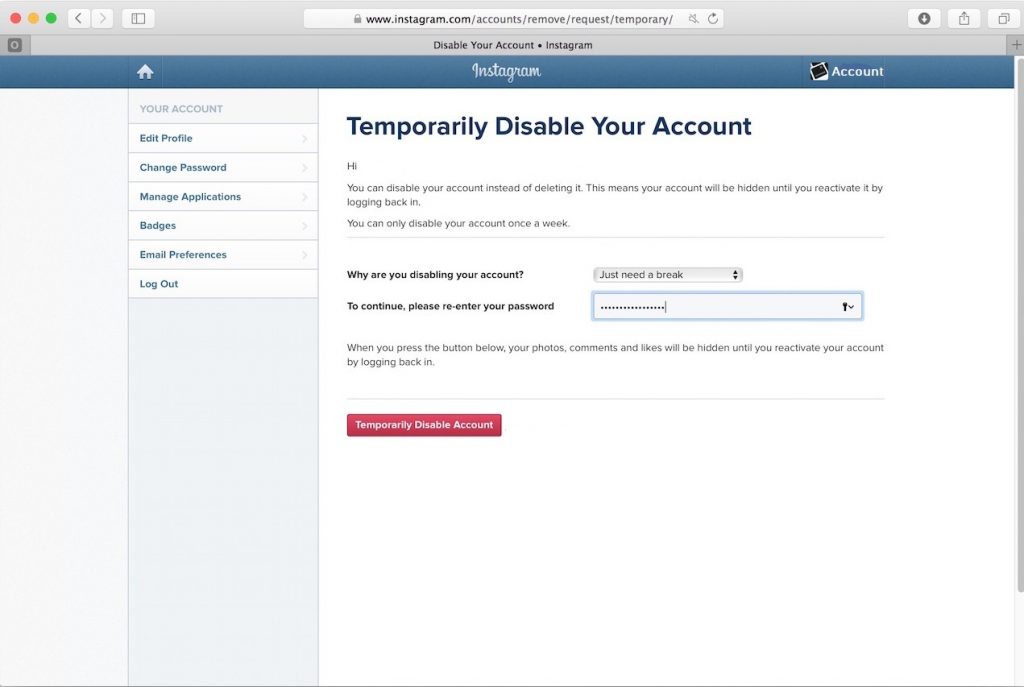
- As always, first, log in to your Instagram account. Just as with the deletion, you cannot deactivate your Instagram account via your app. You will have to log in through the mobile browser or your computer.
- Go to your profile page and click on the Edit Profile’ located at the top of the screen. Now you will see the option ‘Temporarily disable my account’ at the bottom of the page.
- You will be prompted to enter your password to confirm you want to deactivate the account. Also, you can specify the reason for the deactivation under the question ‘Why are you disabling your account?’ and select the reason from the drop-down menu.
- Once done, you will be able to click on confirm which will temporarily disable your account. Till the account is deactivated, your profile, all your photos, videos, likes, and comments will be hidden.
- Do note that you will require your password to disable your account. If you don’t remember it, first change it by clicking on “Forgot Password”. After that, follow the steps mentioned above.
How to reactivate Instagram account?
Now that you have had a bit of a break from the photo-sharing platform, you may think of going back. Reactivating your account is a pretty simple task.
- In order to reactivate your account, visit the official Instagram website – www.instagram.com.
- Log in using your credentials – your username and password.
- Once you click on the login button, you will be taken to your account.
- The reactivation will be automatically done, and all your media will be enabled.
How to download your Instagram photos?
No doubt all the photos and videos that you uploaded in your Instagram account were awesome. Maybe you would like a copy! Who wouldn’t?! It is not a long or tedious task to download a copy of all that you have uploaded here. This includes all your activity on Instagram, such as videos, photos, profile details, and even comments!
In order to download your data, you can visit this URL – https://www.instagram.com/download/request/.
You will be prompted to enter your password. Once done, click on the ‘Request Download’ button.
While it is a simple process to request, Instagram takes up to 48 hours to process the request, gather your data, and send it across to you. Make sure you are not in a hurry!






Frequently Asked Questions
How do I delete my Instagram account?
Instagram offers two options for leaving the platform. You can permanently delete your Instagram account, which removes your entire profile, photos, comments, and likes. Alternatively, you can deactivate your account temporarily, which hides your profile and content but allows you to reactivate and regain access to everything later if you change your mind.
What's the difference between deactivating and deleting my Instagram account?
Deactivating your Instagram account is temporary—your photos, comments, likes, and profile are hidden, but you can reactivate it anytime and restore full access. Deleting your account is permanent; your entire profile and all associated data are removed and cannot be recovered.
Why should I delete my Instagram account?
Many users delete their Instagram accounts due to privacy concerns. Since Instagram is owned by Facebook, which has faced multiple privacy-related controversies, users are wary of its data policies and practices. Additionally, heavy social media use can impact mental health, contribute to low self-esteem, and the platform is designed to keep users addicted to scrolling.
Can I reactivate my Instagram account after deactivating it?
Yes. When you deactivate your Instagram account, it is not permanent. You can log back in at any time to reactivate your account and regain full access to your photos, comments, likes, and profile information.
Is Instagram available on Android?
Yes, Instagram is available as a mobile app on Android devices. You can download it from the Google Play Store. The platform allows users to share photos and videos, including videos up to an hour in length, and offers features like time limit tools to help manage usage.
Leave a Comment