

*** Written specifically for SAMSUNG phones ***
*** Ability to Remove Ads and Export info to the SD Card (Plus version only) ***
Have you ever wanted to know the Country of Origin behind the label ‘MADE BY SAMSUNG’? When the phone was manufactured? How frequently the phone was used? How many times it has been connected to the Charger? Do you want to know the Knox Warranty Void status without entering to the ODIN Download Mode?… Then this app is for you.
* ‘Secret Codes’
– List all of Samsung secret codes (HiddenMenu) on your device.
* ‘Firmware Browser’
– Browse for the stock firmwares available online, for your phone and for any other Samsung model.
– View firmware’s details, and redirect to the SamMobile.com website for the download link.
* ‘CSC Changer’: Allow you to change the CSC.
– WARNING: Changing the CSC will Factory Reset your device (wipe all user data).
– May need root access on the newer models. Also need Multi-CSC firmware.
* ‘Refurbishment Check’
– Supports ALL Samsung models (formerly ‘[Note 3] Fake / Clone Detector’).
– ‘Device Usage Counter’
* ‘CSC Code Lookup’ (CSC – Consumer Software Customization, aka Sales Code, or Region Code)
You can search for the CSC code (e.g. XME or BTU), or the country/network name (e.g. Malaysia or Vodafone…).
* ‘S/N Decoder’ – Obtain information about Country of Origin and Manufacturing Date from Samsung serial number. You can enter serial number from ANY Samsung phone (including OLD phone, FEATURE phone and NON-SMART phone).
* ‘IMEI Analyzer’ – Check the IMEI for the validity by calculating the Check Digit (according to Luhn algorithm).
* Main Features: Displays the following information about your phone.
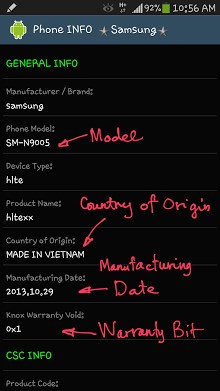
. GENERAL INFO:
– Manufacturer / Brand
– Phone Model
– Device Type
– Product Name
– Country of Origin
– Manufacturing Date
– Knox Warranty Void
. CSC INFO:
– Original CSC Code
– Firmware’s CSC Code
– Active CSC Code
– CSC Country
– CSC Country ISO
– CSC Product Code
. DEVICE ID:
– IMEI
– Serial No.
– Samsung Serial Number
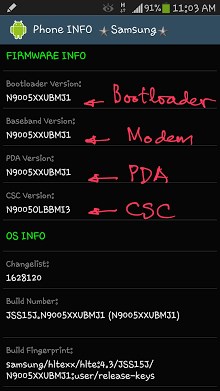
. FIRMWARE INFO:
– Bootloader Version
– Baseband Version
– PDA Version
– CSC Version
. OS INFO:
– Changelist
– Build Number
– Build Fingerprint
– Build Description
– Build Date
– Android Version
. MISC INFO:
– Colour / Internal Storage
– Hardware / Board
– Platform / Chip
– Modem Board
– Hardware Revision
– Mobile Operator Name
– Mobile Network Code
. USAGE HISTORY:
– Headset Connect Counter
– Charger Connect Counter (root required)
– S Pen Detach Counter (root required)
Please be noted that S Pen Detach Counter is available for Galaxy Note series only.
NOTE: This app works properly with the Stock Firmware. On Custom ROM some info may not show correctly.
Supporting thread on XDA: forum.xda-developers.com/showthread.php?t=2609045
NEWS:
Now users can choose to use this ad-supported version or a donated (Plus) version.
For those who have donated to me, you can still update this app without ads.
But if you uninstall it and re-install again, you can not enter the donation key anymore.
In that case you can purchase the Plus version, then tell me your Order number so I can do the refund for you.
Size : 1.5M
Current Version : 1.9.0
Requires Android : 1.6 and up







Frequently Asked Questions
Is Phone INFO - Samsung APK free to download?
Yes, Phone INFO - Samsung is available as a free app. The app offers a free version with core features, plus a Plus version that includes the ability to remove ads and export information to the SD card.
What information can the Samsung info APK display about my phone?
The app displays comprehensive device information including manufacturer details, phone model, country of origin, manufacturing date, Knox warranty void status, CSC codes, CSC country information, and other general phone specifications.
Does Phone INFO - Samsung work on all Samsung devices?
The app is written specifically for Samsung phones. Features like the Refurbishment Check support all Samsung models. However, some advanced features like CSC Changer may require root access on newer models and need Multi-CSC firmware.
Can I check my phone's Knox warranty status without using ODIN?
Yes, this is one of the key features of the app. You can check the Knox Warranty Void status directly from the app without needing to enter ODIN Download Mode.
What tools does the Phone INFO Samsung APK provide for analyzing phone details?
The app includes several specialized tools: S/N Decoder to obtain country of origin and manufacturing date from a Samsung serial number, IMEI Analyzer to validate IMEI numbers using the Luhn algorithm, CSC Code Lookup for searching region codes, and a Firmware Browser to view available stock firmwares for your Samsung model.
Is there a way to export phone information from the app?
Yes, the Plus version of the app includes the ability to export phone information to the SD card, along with ad removal features for an enhanced user experience.
Very Good web site of appsapk for downloading thanks for every member of this site
very excellent website for android apk software for download