


Google Text-to-Speech APK — Speech Engine for Android
Google Text-to-Speech is the free Android engine that reads text aloud — powering screen readers, audiobooks, navigation and accessibility in dozens of languages. Download the latest APK below.
• Google Play Books to 'Read Aloud' your favourite book
• Google Translate to speak translations aloud so that you can hear the pronunciation of a word
• TalkBack and accessibility applications for spoken feedback across your device
• … and many other applications in Play Store
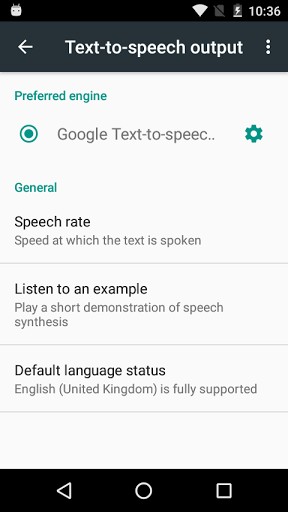
To use Google Text-to-speech on your Android device, go to Settings > Language & Input > Text-to-speech output. Select Google Text-to-speech Engine as your preferred engine. Note, on many Android devices, Google Text-to-speech is already turned on, but you can update to the latest version here.
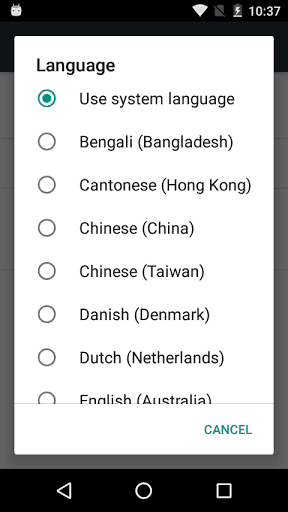
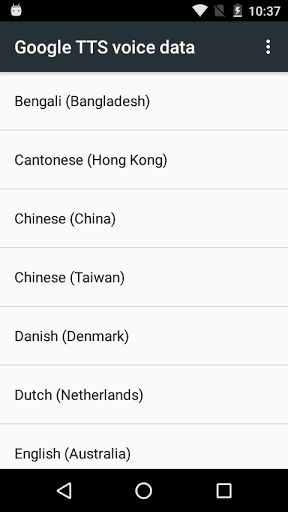
Supported languages: Bangla (Bangladesh), Bangla (India), Cantonese (Hong Kong), Czech, Danish, Dutch, English (Australia), English (India), English (United Kingdom), English (United States), Finnish, French, German, Hindi, Hungarian, Indonesian, Italian, Japanese, Khmer, Korean, Mandarin (China), Mandarin (Taiwan), Nepali, Norwegian, Polish, Portuguese (Brazil), Russian, Sinhala, Spanish (Spain), Spanish (United States), Swedish, Thai, Turkish, Ukrainian and Vietnamese.
What’s New
• Added support for Bangla (India), Czech, Khmer, Nepali, Sinhala and Ukrainian.
• Number processing can now be turned off in settings. This produces a more literal pronunciation of the text. For example 09/10/2017 will be pronounced as oh nine slash ten… Only available for our English voices.
• Intonation control is now available for more voices.
• Various other improvements to our voices.
Additional information
Google Text-to-speech
com.google.android.tts
23.12.333383720
14.16 MB
1,000,000,000+ downloads
Google Inc.





Frequently Asked Questions
What is Google Text-to-Speech APK and what does it do?
Google Text-to-Speech is a free Android utility that powers applications to read text on your screen aloud. It works with Google Play Books for 'Read Aloud' features, Google Translate for hearing pronunciations, TalkBack and accessibility applications for spoken feedback, and many other apps in the Play Store.
How do I install and enable Google Text-to-Speech on my Android device?
To use Google Text-to-Speech on your Android device, go to Settings > Language & Input > Text-to-speech output. Then select Google Text-to-speech Engine as your preferred engine. Note that on many Android devices, Google Text-to-Speech is already turned on, but you can update to the latest version through this page.
Is Google Text-to-Speech free to download and use?
Yes, Google Text-to-Speech is completely free. There are no costs to download or use this utility application on your Android device.
What languages does Google Text-to-Speech support?
Google Text-to-Speech supports over 30 languages including Bangla (Bangladesh and India), Cantonese, Czech, Danish, Dutch, English (Australian, Indian, UK, and US variants), Finnish, French, German, Hindi, Hungarian, Indonesian, Italian, Japanese, Khmer, Korean, Mandarin (China and Taiwan), Nepali, Norwegian, Polish, Portuguese (Brazil), Russian, Sinhala, Spanish (Spain and US), Swedish, Thai, Turkish, Ukrainian, and Vietnamese.
What are the recent improvements to Google Text-to-Speech?
Recent updates added support for Bangla (India), Czech, Khmer, Nepali, Sinhala and Ukrainian. The app now allows number processing to be turned off in settings for more literal pronunciation (available for English voices), intonation control for more voices, and various other voice improvements.
Is Google Text-to-Speech safe and secure to download?
Yes, Google Text-to-Speech is a legitimate utility developed by Google Inc. and is widely used across Android devices for accessibility and reading features. It is a trusted, first-party Google application available for free download.
To use an actual right pronouncation for me.
good
awesomeeeeeee