
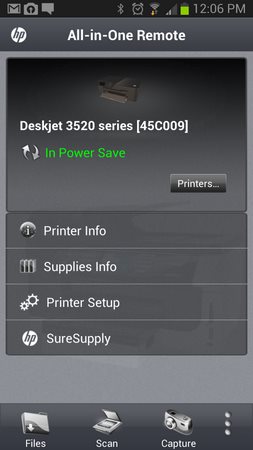
HP All-in-One Printer Remote let you check status of your HP Printers and All-in-One devices that are attached to your Wi-Fi network. It supports HP printer with “ePrint” on it*.
Key Features & Benefits:
• Check the status of your printer. Is it out of paper? Is the device busy?
• Check how much ink and toner are left.
• What is the name and number of ink cartridges and toners my printer use?
• Save or email supply info so that you can see it when you are at the store
• Scan from your scanner, from glass or document feeder.
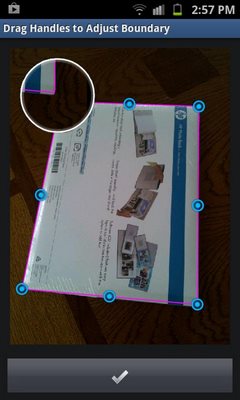
• Scan document using the camera on the phone, and enhance it with HP’s mobile scanning technology.
• Save and Share scanned and camera captured document to cloud and email.
• Create multi-page .pdf file from scanned images and camera captured images
Both printers on local wireless network and printers that are set to wireless direct printing mode are supported.
*Full list of supported printers available at Hewlett-Packard web site.
For full list, http://h10025.www1.hp.com/ewfrf/wc/document?docname=c02814760&cc=us&dlc=en&lc=en#N121
Size : 2.6M
Current Version : 1.2.97
Requires Android : 2.3.3 and up







Frequently Asked Questions
Is HP All-in-One Printer Remote free to download?
Yes, the HP All-in-One Printer Remote app is free to download and use on your Android device.
What Android version does HP All-in-One Printer Remote require?
HP All-in-One Printer Remote requires Android 2.3.3 and up to run properly on your device.
What can I do with the HP All-in-One Printer Remote app?
With this app, you can check your printer's status, monitor ink and toner levels, scan documents from your scanner or using your phone's camera, and create multi-page PDF files from scanned or captured images. You can also save and share documents to cloud storage and email.
Which HP printers are supported by this remote app?
The app supports HP printers with ePrint capability that are connected to your Wi-Fi network. It also works with printers in wireless direct printing mode. A full list of supported models is available on the Hewlett-Packard website.
How large is the HP Printer Remote app download?
The HP All-in-One Printer Remote app is 2.6MB in size, making it a lightweight download for most Android devices.
Can I scan documents using the HP All-in-One Printer Remote app?
Yes, you can scan documents directly from your printer's glass or document feeder. Additionally, you can use your phone's camera to capture documents and enhance them using HP's mobile scanning technology, then save them as multi-page PDFs.
Thanks for your Site and it is worth to download, I checked it. My number is 100 of 100 to this site.
Excelente site!