
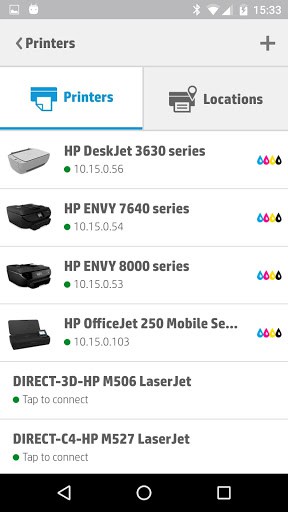
Supports all HP ePrint-enabled Printers and over 200 HP networkable legacy printer models including HP Officejet, HP LaserJet, HP Photosmart, HP Deskjet and HP Envy. For a complete list of HP Printers compatible with this app, go to http://support.hp.com/us-en/document/c03722645.
Give it a try!
Key Features & Benefits:
• Print from your smartphone or tablet over a local Wi-Fi network, or directly to an HP wireless direct or HP Wi-Fi Direct supported printer.
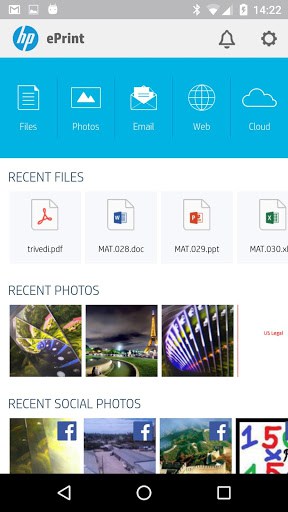
• Print from virtually anywhere via the Cloud to a web-connected HP ePrint printer. [1]• Print photos, PDFs, web pages, emails and Microsoft Office documents.
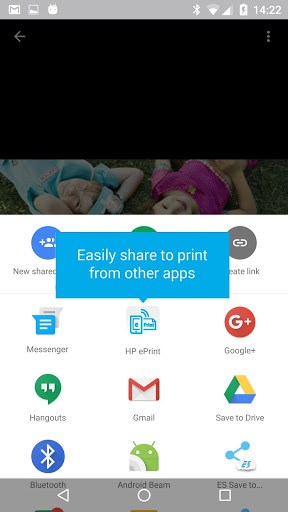
• Share to Print from other apps. Print content seamlessly from other Android apps supporting share. Simply share content and select the HP ePrint App to enable printing.
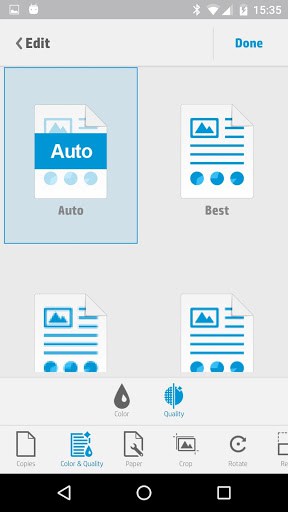
• Enjoy enhanced Mobile Print Job Control such as variable photo sizes, number of copies, two-sided printing, and the ability to auto-select a dedicated photo tray.
And more:
• Print on the go: Locate and print securely to thousands of HP Public Print Locations worldwide. Locations such a FedEx Kinkos, UPS stores and many Airport Kiosks and VIP lounges. Let the app locate and find the closest print location for you: a FedEx Kinko, a UPS store, an airport kiosk or VIP Lounge, and many more. [1] [2]• Touch to print with NFC: With your content previewed within the app, simply touch your NFC-enabled mobile device to an HP-NFC enabled printer. For more details and a list of supported printers go to www.hp.com/go/nfcprinting.
Interested in scanning content to your phone? Install our companion app, HP AIO Remote.
To learn more details about this app go to http://support.hp.com/us-en/document/c01923321
[1] Printing to an HP web-enabled printer requires an Internet connection and may require an HP ePrint account registration. Mobile devices require Internet connection and email capability. May require wireless access point. Separately purchased data plans or usage fees may apply. Print times and connection speeds may vary. For a list of eligible printers, supported documents and image types, and other HP ePrint details, see http://support.hp.com/us-en/document/c03721293.
[2] Usage of HP ePrint app at mobile print locations requires separately purchased wireless internet service. Availability and cost of printing varies by mobile print location. Public Print Location program availability in US, Canada and select European countries.
This product includes code licensed under the GNU General Public License, the GNU Lesser General Public License, and/or certain other open source licenses. A complete machine-readable copy of the source code corresponding to such code is available upon request. This offer is valid to anyone in receipt of this information and shall expire three years following the date of the final distribution of this product version by Hewlett-Packard Company.
To obtain such source code, send a check or money order in the amount of US $10.00 to:
Hewlett-Packard Company
Attn: General Counsel
3000 Hanover Street
Palo Alto, CA 94304
USA
Please specify the product and version for which you are requesting source code.
You may also request a copy of this source code free of charge at https://h30670.www3.hp.com/opensource/.
What’s New
Defect fixes
Additional information
HP ePrint
com.hp.android.print
4.3.0
19.22 MB
10,000,000+ downloads
HP Inc.




Frequently Asked Questions
What is the HP ePrint app and what does it do?
HP ePrint is a free Android app that makes printing easy from your smartphone or tablet, whether you are at home, in the office, or on the go. It supports all HP ePrint-enabled printers and over 200 HP networkable legacy printer models including HP Officejet, HP LaserJet, HP Photosmart, HP Deskjet, and HP Envy.
Can I download the HP ePrint app for free?
Yes, HP ePrint is available as a free download for Android devices. There are no costs to install or use the app for basic printing functionality.
How do I use the HP ePrint app to print from my Android phone?
HP ePrint allows you to print over a local Wi-Fi network, directly to an HP wireless direct or HP Wi-Fi Direct supported printer, or from anywhere via the cloud to a web-connected HP ePrint printer. You can also share content from other Android apps to HP ePrint and select it as your printing destination.
What file types and content can I print with HP ePrint?
HP ePrint supports printing photos, PDFs, web pages, emails, and Microsoft Office documents. You can also use the 'Share to Print' feature to send content from other Android apps that support sharing functionality.
Does HP ePrint support NFC printing?
Yes, HP ePrint includes touch-to-print functionality with NFC. If your mobile device and printer are both NFC-enabled, you can simply touch your device to an HP NFC-enabled printer to print with your content previewed in the app. Check HP's website for a complete list of supported NFC printers.
Can I use HP ePrint at public locations like FedEx or airports?
Yes, HP ePrint allows you to print securely at thousands of HP Public Print Locations worldwide, including FedEx Kinkos, UPS stores, airport kiosks, and VIP lounges. The app can help you locate and find the closest print location to you.













It.is not.supporting HP deskjek 1510 printer
Not color laserjet 4600 either
eprint software is supported by hp wi fi enabled printers namely,2545.
1510 is not supported