

Blackmagic Camera brings professional, cinema-grade controls to your Android phone — manual focus, shutter, ISO, white balance and Blackmagic’s renowned colour science in one free app. It turns your phone into a serious filmmaking tool. Explore more photography apps for Android.
The Blackmagic Camera Android app is transforming how filmmakers and photographers capture professional-quality visuals using their mobile devices. It brings a powerful suite of tools for video recording and photography, making it ideal for both professionals and hobbyists. The app’s seamless integration with Android devices provides users with the ability to shoot high-quality videos, manage settings, and enhance their creative output with ease.
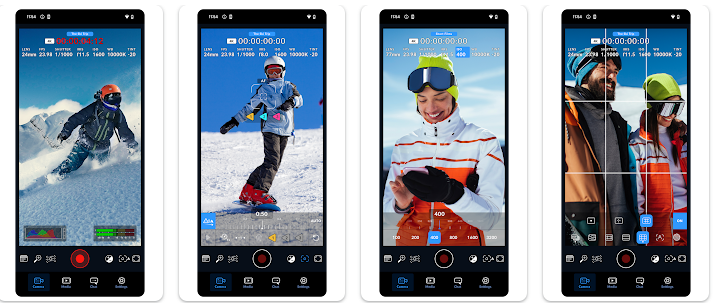
Key Features of the Blackmagic Camera Android App
Data Safety
Data safety is a priority with the Blackmagic Camera app, ensuring users can trust the platform with their personal content. The app adheres to stringent data protection standards to safeguard your privacy.
- End-to-end encryption keeps your photos and videos secure.
- No unauthorized sharing of personal data with third-party services.
- Privacy-focused permissions that allow you to control access to your camera, location, and storage.
- Regular security updates to protect against vulnerabilities and breaches.
With these safety measures, the app ensures that your data remains secure while you focus on capturing stunning visuals.
Price : Free
Developer : Blackmagic Design
Additional Information
The app is regularly updated to enhance its functionality, ensuring users always have access to the best tools for their creative needs.
- Version updates: Frequent updates introduce new features and improve existing ones.
- Compatibility: Works with a wide range of Android devices.
- User interface: Designed to be intuitive, allowing users of all experience levels to easily navigate the app and its features.
What’s New
The latest version of the Blackmagic Camera app includes several new features designed to improve user experience and the quality of your projects:
- Enhanced video stabilization for smoother, shake-free recordings.
- Faster processing speeds for quicker video editing and rendering.
- New camera settings including manual exposure adjustments and focus locking for greater control over your footage.
- Improved user interface to make navigation easier.
- Bug fixes and performance improvements for a seamless experience.
Device Compatibility & Requirements
Before downloading the Blackmagic Camera app, it’s important to verify that your device meets the necessary requirements to run the application smoothly and access all its professional features.
What to Check Before Installing
- Android Version: Ensure your device runs a compatible version of Android. The app is designed to work across a wide range of Android devices, but newer versions of the operating system are typically recommended for optimal performance.
- Device Specifications: Since this is a cinema-grade camera application with manual controls and advanced colour science processing, your phone should have adequate processing power and RAM to handle video recording and real-time settings adjustments without lag.
- Storage Space: Professional video footage requires significant storage capacity. Check that your device has enough free space not only for the app installation, but also for storing the high-quality videos you’ll capture.
- Camera Hardware: Your device’s camera must be functional and capable of manual exposure control. The app’s features like manual focus, shutter, and ISO adjustment depend on your phone’s camera capabilities.
- Permission Access: The app requires permissions to access your camera, storage, and potentially location data for geotagging. Review and enable these permissions during installation to ensure full functionality.
The intuitive user interface accommodates both professionals and hobbyists, but having a device with solid hardware specifications will provide the best experience when working with manual controls and advanced colour grading features.



Frequently Asked Questions
Is Blackmagic Camera APK free to download?
Yes, the Blackmagic Camera app is completely free to download and use on your Android device. There are no hidden costs or premium subscriptions required to access its core features.
How do I install the Blackmagic Camera APK on my Android device?
You can download the Blackmagic Camera APK from AppsApk.com and install it on your Android device. Once downloaded, enable installation from unknown sources in your device settings, then tap the APK file to complete the installation process.
Is the Blackmagic Camera app safe to use?
Yes, the Blackmagic Camera app prioritizes data safety with end-to-end encryption for your photos and videos, privacy-focused permissions that give you control over camera and location access, and regular security updates to protect against vulnerabilities. The app does not share your personal data with third-party services.
What Android devices are compatible with Blackmagic Camera?
The Blackmagic Camera app is designed to work with a wide range of Android devices. The app features an intuitive user interface compatible across various Android phones and tablets, though specific minimum Android version requirements may vary.
What are the key features of the Blackmagic Camera app?
The app includes professional-grade video recording capabilities, high-quality photography tools, enhanced video stabilization for smoother recordings, faster processing speeds for editing and rendering, and an intuitive interface suitable for both professionals and hobbyists.
How often is the Blackmagic Camera app updated?
The Blackmagic Camera app is regularly updated to enhance functionality and introduce new features. Recent updates have included improved video stabilization, faster processing speeds, and additional camera features to improve your creative output.
Leave a Comment